Register Actual Profit Transfer Document (9KE0)
Menu: Accounting > Controlling > Profit Center Accounting > Actual Postings > Profit Center Document > Enter
Process Overview: Perform Actual transfer posting of Profit center account document.
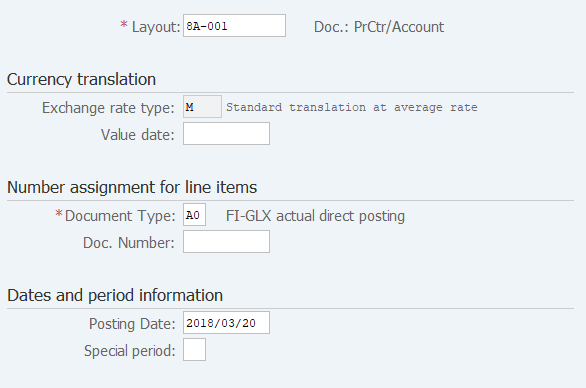
Screen 1:
Operation Process:
| 1. | {{Layout}} | Select the '8A-001'(Doc.: PrCtr/Account). | |
| 2. |  |
Click [Execute]. |
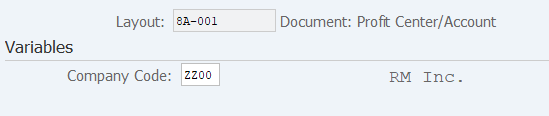
Screen 2:
Operation Process:
| 1. | {{Company Code}} | Enter the Company Code. | |
| 2. |  |
Click [Entry Screen]. |
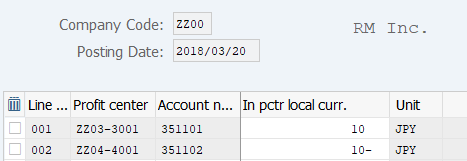
Screen 3:
Operation Process:
|
Line 1 |
|||
| 1. | {{Profit center}} | Enter the Profit center of the sender. | |
| 2. | {{Account number}} | Enter the Account number of the sender. | |
| 3. | {{In pctr local curr.}} | Enter the transfer amount. | |
|
Line 2 |
|||
| 4. | {{Profit center}} | Enter the Profit center of the receiver. | |
| 5. | {{Account number}} | Enter the Account number of the receiver. | |
| 6. | {{In pctr local curr.}} | Enter the transfer amount. | |
| 7. | Click [Enter]. | ||
| 8. |  |
Click [Save]. | |
Copyright(c) MITSUI KINZOKU YOURSOFT Inc.