Cancel Actual Profit Transfer Document (9KE9)
Menu: Accounting > Controlling > Profit Center Accounting > Actual Postings > Profit Center Document > Display
Process Overview: Cancel (reverse) actual transfer documents of the profit center.
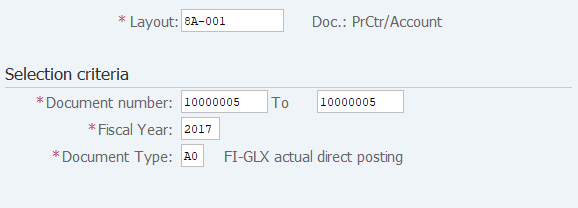
Screen 1:
Operation Process:
| 1. | {{Layout}} | Select the '8A-001' (Doc.: PrCtr/Account). | |
| 2. |  |
Click [Execute]. |
Screen 2:

Operation Process:
| 1. | {{Company Code}} | Enter the Company Code. | |
| 2. |  |
Click [Entry Screen]. |
Screen 3:
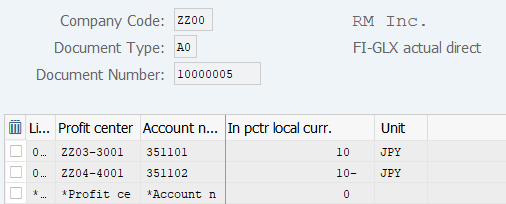
Operation Process:
| 1. | The specified document can be referenced. |
Screen 4:
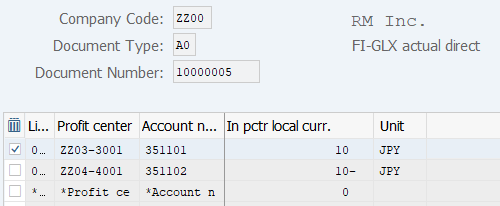
Operation Process:
| 1. | Check if the document that is displayed is the target documents. | ||
| 2. | Select the 1st item. (Click on the box at the left end of the item.) | ||
| 3. |  |
Click [Reverse Document]. |
Screen 5:
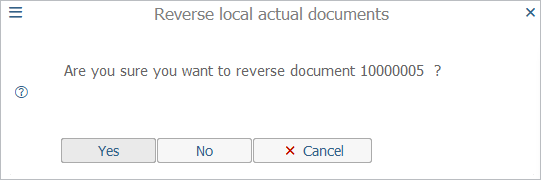
Operation Process:
| 1. |
 |
A reverse final confirmation is displayed. To execute, click [Yes]. |
Copyright(c) MITSUI KINZOKU YOURSOFT Inc.