Back to Menu No.06-01-03
Price Update (CK24)
Menu: Accounting > Controlling > Product Cost Controlling > Product Cost Planning > Material Costing > Price Update
Process Overview: Mark and release the standard cost.
Remarks:
| 1. | Release of standard cost can be executed only once in the corresponding month. | |
| 2. | For product costing with a date earlier than the system date specified, releasing cannot be executed. | |
| 3. | For product costing with a future date specified, release cannot be executed until the system date reaches the specified date. |
Screen 1-1:
Operation Process:
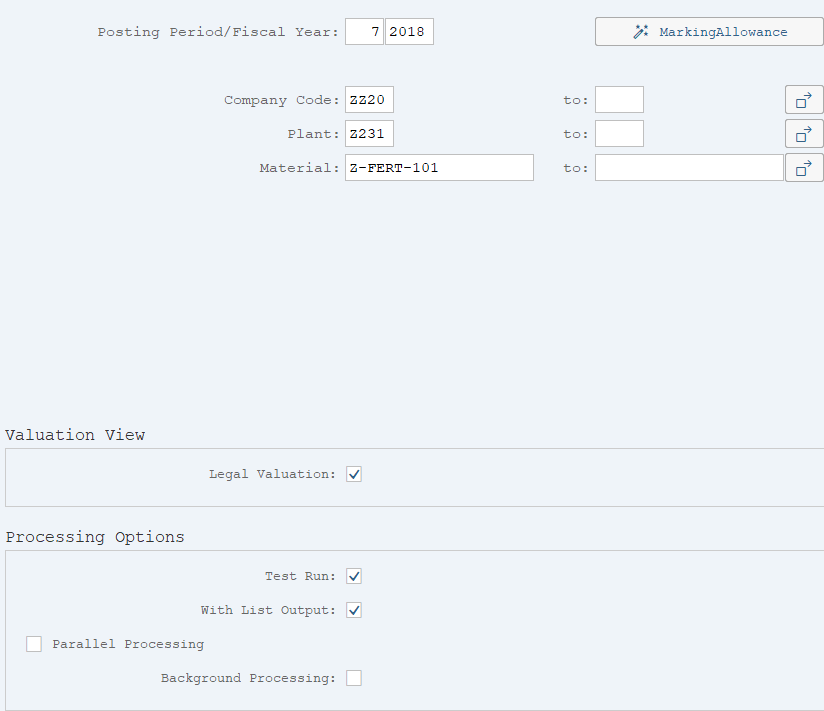
| 1. |  |
Click [Marking]. | |
| 2. | {{Posting Period/Fiscal Year}} | Enter the fiscal year/fiscal period of the standard cost to be marked. | |
| 3. |  |
Click [Marking Allowance]. |
Screen 1-2:
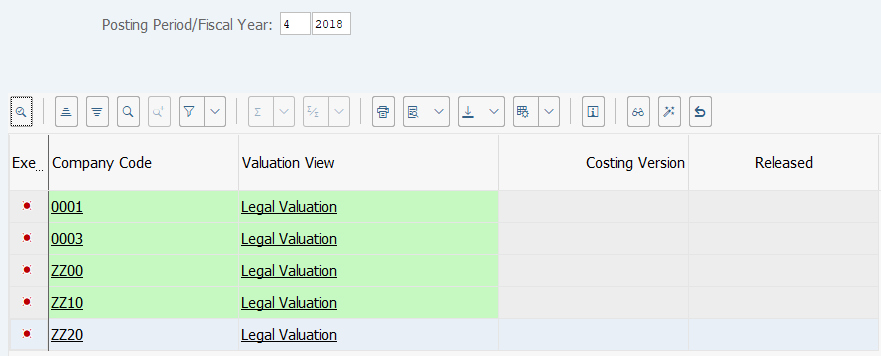
Operation Process:
| 1. | Select the line for the company code to be marked. | ||
| 2. |  |
Click [Issue marking allowance]. | |
Screen 1-3:
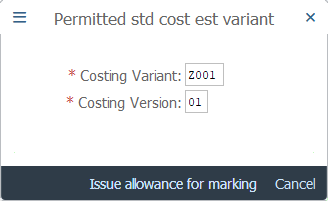
Operation Process:
| 1. | {{Costing Variant}} | Enter the Costing Variant. | |
| 2. | {{Costing Version}} | Enter the Costing Version. | |
| 3. |  |
Click [Issue allowance for marking]. |
Screen 1-4:
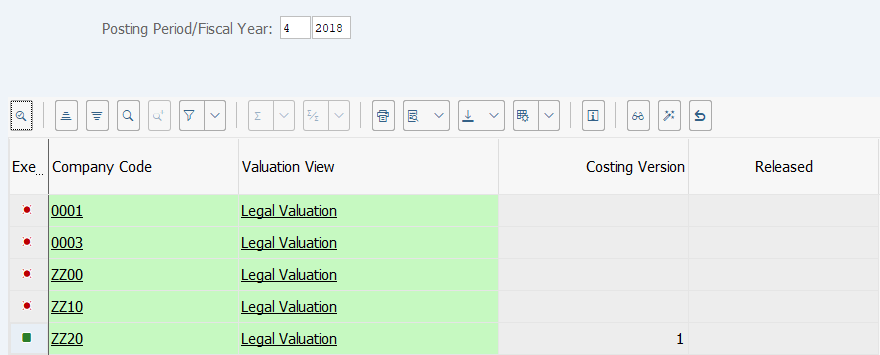
Operation Process:
| 1. | {{Executed}} | Check that  is shown in the Executed field of the selected company code. is shown in the Executed field of the selected company code. |
|
| 2. |  |
Click [Back]. |
Screen 1-5:
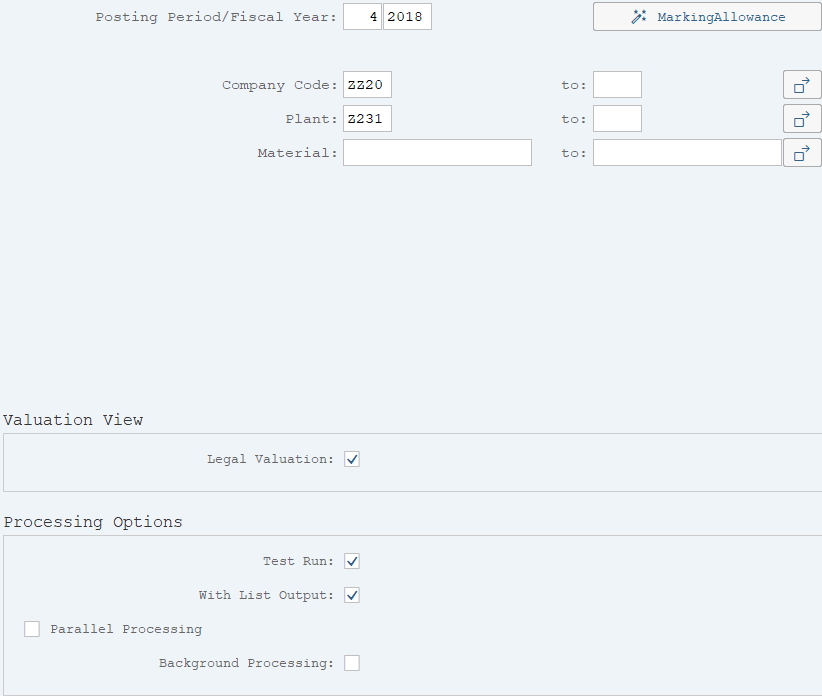
Operation Process:
| 1. | {{Posting Period/Fiscal Year}} | Enter the Fiscal Year/Fiscal Period when the standard cost is marked. | |
| 2. | {{Company Code}} | Enter the Company Code. | |
| 3. | {Plant} | Enter the Plant code. | |
| 4. | {Material} | Enter the Material number. | |
| Processing Options | |||
| 5. | {Test Run} | Tick this option to run test | |
| 6. | {With List Output} | Tick this option to display overview screen of the material. | |
| 7. | {Parallel Processing} | Tick this option to perform parallel processing. | |
| 8. | {Background Processing} | Tick this option to perform background (job) processing. | |
| 9. |  |
Click [Execute]. | |
Remarks:
| 1. | If [Execute] is clicked without company code, plant, or material specified, marking will be executed for all materials for which valid (for the specified fiscal year/period) standard cost estimates have been registered. | |
| 2. | For the first execution, select [Test run] before execution. | |
| 3. | If the test result is OK, deselect Test run option and execute. |
Screen 1-6:

Operation Process:
| 1. | Check that there are no errors. |
Screen 2-1:
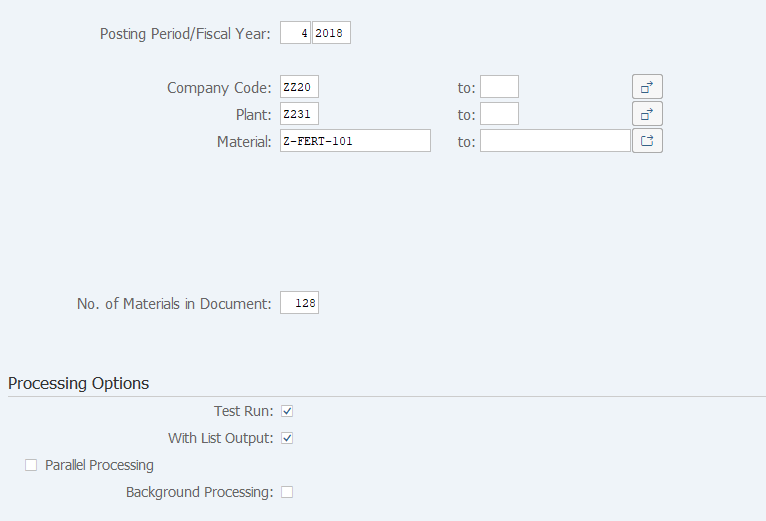
Operation Process:
| 1. |  |
Click [Release]. | |
| 2. | {{Posting Period/Fiscal Year}} | Enter the Fiscal Year/Fiscal Period for which the standard cost is released. | |
| 3. | {{Company Code}} | Enter the Company Code. | |
| 4. | {Plant} | Enter the Plant. | |
| 5. | {Material} | Enter the Material number. | |
| 6. | {No. of Materials in Document} | Enter the number of materials displayed in the document registered when standard cost is released. | |
| Processing Options | |||
| 7. | {Test Run} | Tick this option to run test | |
| 8. | {With List Output} | Tick this option to display overview screen of the material. | |
| 9. | {Parallel Processing} | Tick this option to perform parallel processing. | |
| 10. | {Background Processing} | Select this option to perform background (job) processing. | |
| 11. | |
Click [Execute]. | |
Remarks:
| 1. | If [Execute] is clicked without company code, plant, or material specified, release will be executed for all materials for which valid (for the specified fiscal year/period) standard cost estimates have been registered. | |
| 2. | For the first execution, select [Test run before] execution. | |
| 3. | If the test result is OK, deselect Test run option and execute. |
Screen 2-2:
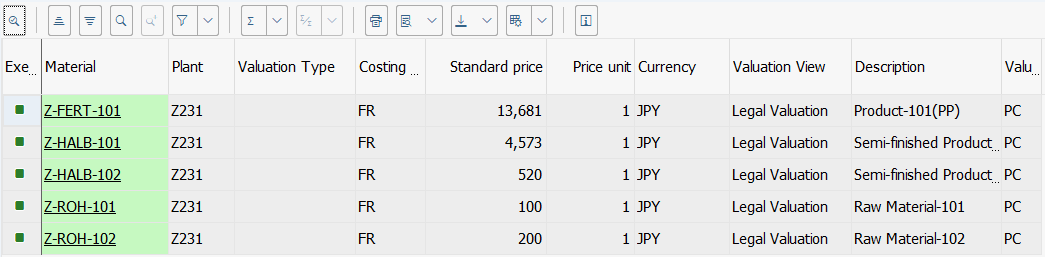
Operation Process:
| 1. | Check that there are no errors. |
Remarks:
| 1. | To perform release, it is required that FI fiscal period and MM fiscal period for the cost-setting month are open. | |
| 2. | Release of standard cost can be executed only once in the corresponding month. (Cancellation or reprocessing cannot be performed.) |
Copyright(c) MITSUI KINZOKU YOURSOFT Inc.