Back to Menu No.06-05-01
Material Price Analysis (CKM3)
Menu: Accounting > Controlling > Product Cost Controlling > Actual Costing/Material Ledger > Material Ledger > Material Price Analysis
Process Overview: Display the costing information of the material by date.
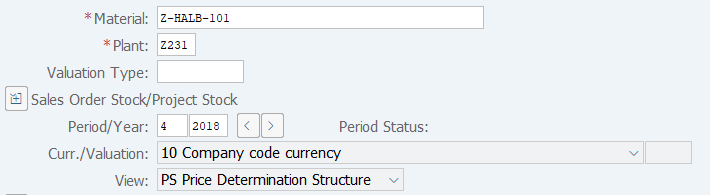
Screen 1:
Operation Process:
| 1. | {{Material}} | Enter the material number. | |
| 2. | {{Plant}} | Enter the plant. | |
| 3. | {{Period/year}} | Enter the fiscal year/period. | |
| 4. | Press [Enter] key. |
Screen 2:
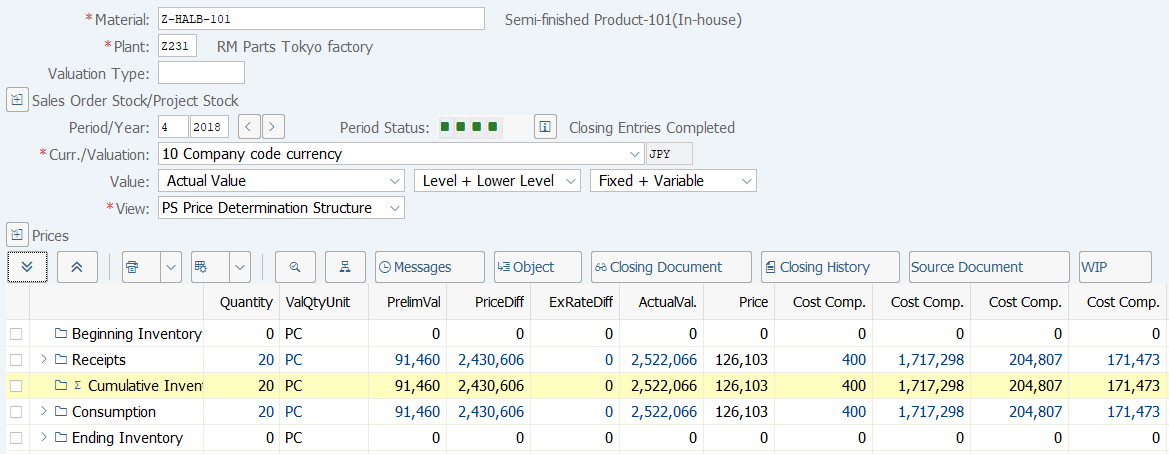
Operation Process:
| 1. | All the processing posted to the material ledger are displayed. |
How to check the report:
(1) Period status:
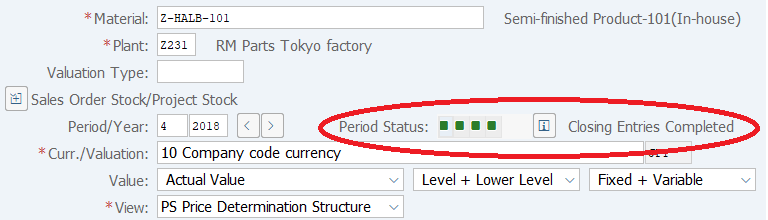
Operation Process:
| 1. | You can use the period status to check how far a certain material has been processed. | ||
| Start of term: | MM fiscal period is open but no actual posting has been performed yet | ||
| Quantity entered and value: | Processing up to actual posting has been completed | ||
| Single-level price determination: | Processing up to single-level price computation for actual costing has been completed | ||
| Multi-level price determination: | Processing up to multi-level price computation for actual costing has been completed | ||
| Closing entry executed: | Processing up to closing operation posting for actual costing has been completed. | ||
(2) Standard cost/periodic unit price/stock quantity/stock value

Operation Process:
| 1. |  |
Click [Price and inventory values]. | |
| 2. | Standard cost, periodic unit price, current stock quantity and stock value are displayed. | ||
(3) Details by category (beginning inventory)

Operation Process:
| 1. |  |
Quantity and amount carried forward from the previous period are displayed. |
Supplement:
| 1. | The amounts displayed include the valuation amount based on the standard cost and the difference between standard valuation amount and actual cost valuation amount. | ||
| . | PrelimVal: | Valuation amount based on standard cost is displayed. | |
| . | Price diff: | The difference between valuation amount based on standard cost and valuation amount based on actual cost is displayed. | |
(4) Details by category (goods receipt)

Operation Process:
| 1. |  |
Goods receipt details registered in the corresponding fiscal period are displayed. Details can be viewed on a document basis by drilling down. |
|
| Details of goods receipt are divided into further categories based on processing types. (Ex. 'Production', 'Stock transfer') |
(5) Details by category (cumulative inventory)

Operation Process:
| 1. |  |
Details of beginning inventory + all goods receipts are displayed. |
(6) Details by category (consumption)
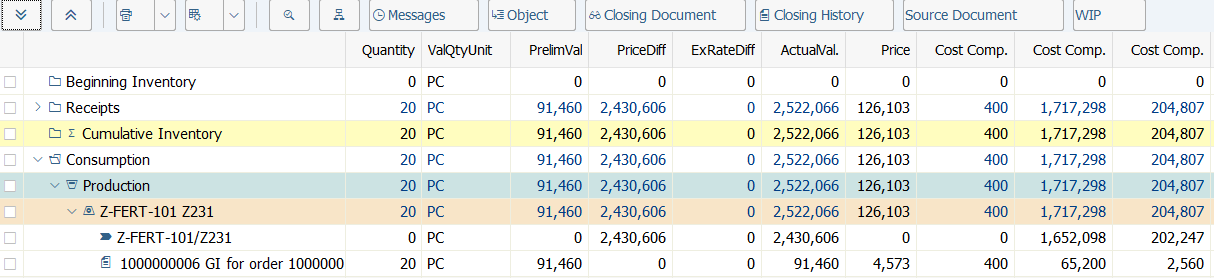
Operation Process:
| 1. |  |
Consumption details registered in the corresponding fiscal period are displayed. Details can be viewed on a document basis by drilling down. |
|
| Details of consumption are divided into further categories based on processing types. (Ex. 'Consumption', 'Division') |
(7) Details by category (ending inventory)

Operation Process:
| 1. |  |
Cumulative inventory - Details of all goods issues are displayed. |
Copyright(c) MITSUI KINZOKU YOURSOFT Inc.