Back to Menu No.06-07-01
Setting Valuation Level to Live (CKMSTART)
Menu: Accounting > Controlling > Product Cost Controlling > Actual Costing/Material Ledger > Environment > Production Startup > Set Valuation Areas as Productive
Process Overview: Start live for actual costing/material ledger on a plant basis.
Remarks:
| 1. | Perform live start process before registering material-related data at the corresponding plant. | |
| 2. | Do not execute the process more than once at each plant. |
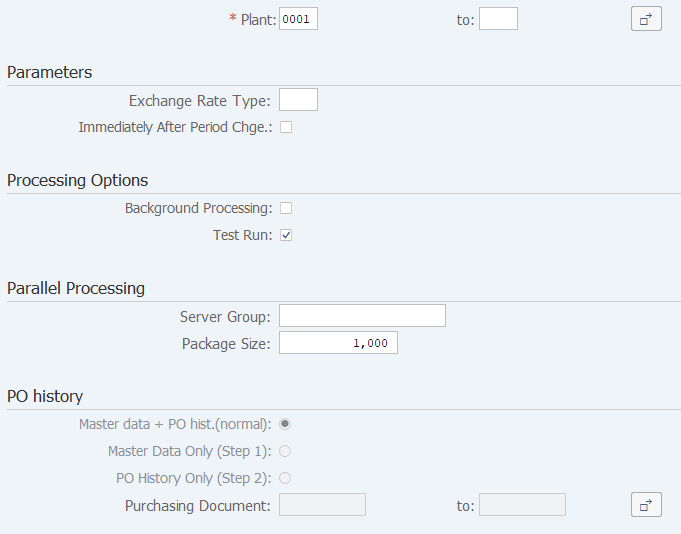
Screen 1:
Operation Process:
| 1. | {{Plant}} | Enter the plant for which to start live. | |
|
Processing Options |
|||
| 2. | {Background Processing} | Select this option to perform background (job) processing. | |
| 3. | {Test run} | Select this option to run test. | |
| 4. |
 |
Click [Execute]. (Test run) | |
Remarks:
| 1. | For the first execution, select [Test run] before execution. | |
| 2. | If the test result is OK, deselect Test run option and execute. |
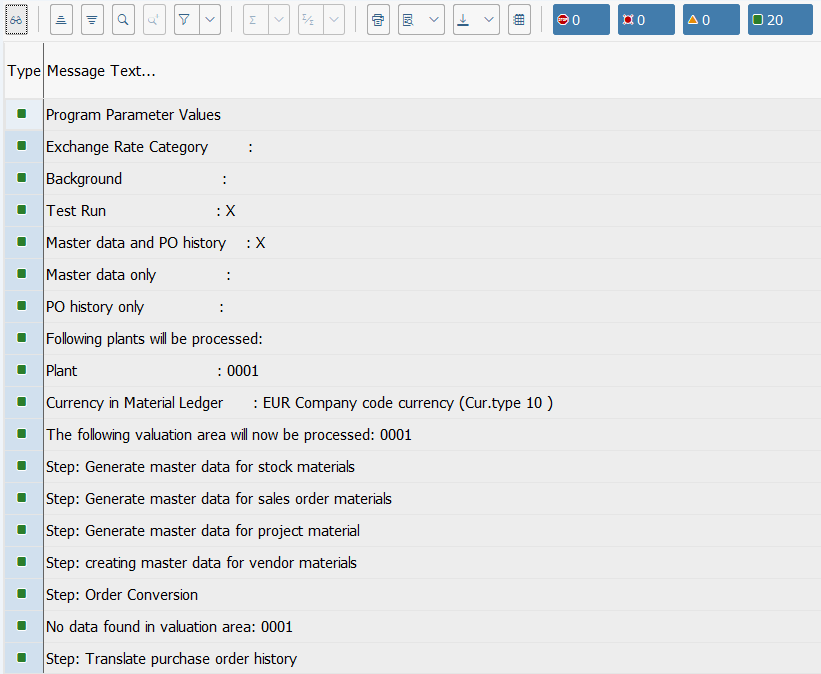
Screen 2:
Operation Process:
| 1. | Check that there are no errors. |
Copyright(c) MITSUI KINZOKU YOURSOFT Inc.