Back to Menu No.06-01-06
Creating Production Lot Cost Estimate (CKW1)
Menu: Accounting > Controlling > Product Cost Controlling > Product Cost Planning > Material Costing > Production Lot Cost Estimate > Create
Process Overview: Create cost estimate of each market production.
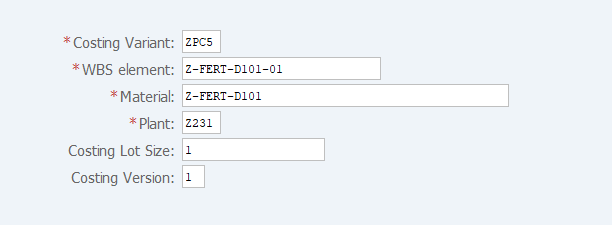
Screen 1:
Operation Process:
| 1. | {{Costing Variant}} | Enter the Costing Variant. | |
| 2. | {{WBS element}} | Enter the WBS (Production Lot) element. | |
| 3. | {{Material}} | Enter the Material. | |
| 4. | {{Plant}} | Enter the Plant of material code. | |
| 5. | {Costing Lot Size} | Enter the Costing Lot Size. | |
| 6. | {{Costing Version}} | Enter the Costing Version. | |
| 7. | Press [Enter] key . |
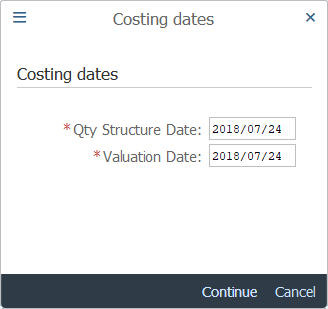
Screen 2:
Operation Process:
| 1. | {{Qty Structure Date}} | Enter the quantity structure date to be applied to cost estimate. | |
| 2. | {{Valuation Date}} | Enter the date when the material or activity for cost estimate is valuated. | |
| 3. |  |
Click [Continue]. |
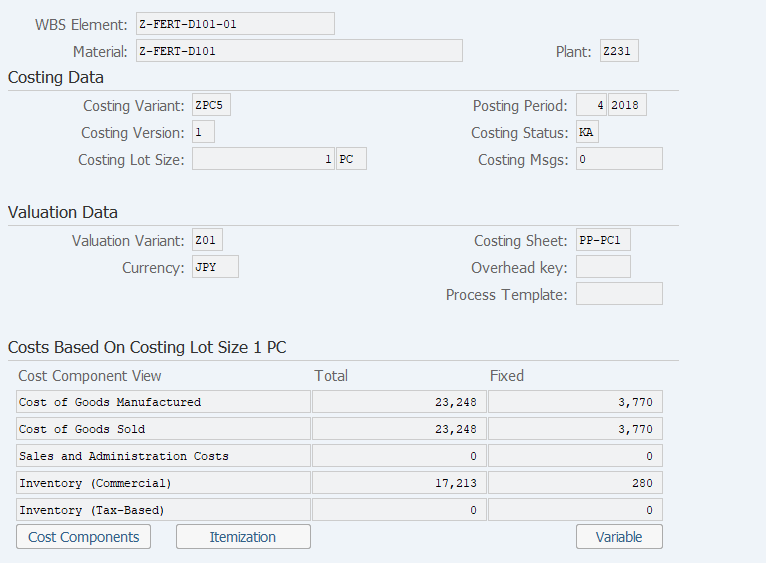
Screen 3:
Operation Process:
| 1. | Check the estimate result. | ||
| 2. |  |
Click [Save]. | |
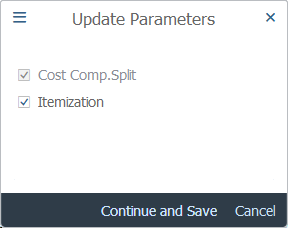
Screen 3:
Operation Process:
| 1. |  |
Click [Continue and Save]. |
Copyright(c) MITSUI KINZOKU YOURSOFT Inc.