Back to Menu No.01-01-01
Create Cost Element Group (KAH1)
Menu: Accounting > Controlling > Cost Element Accounting > Master Data > Cost Element Group > Create
| Process Overview: | Create a Cost element group. |
| And it makes possible to display the report of Cost elements which were grouped, by the collective process. |
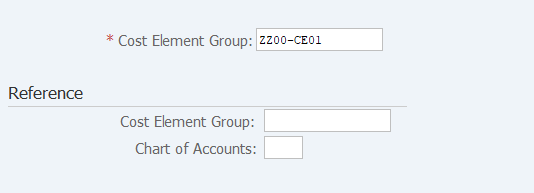
Screen 1:
Operation Process:
| 1. | {{Cost Element Group}} | Enter the Cost element group to be registered. | |
| 2. |  |
Click [Enter]. |
Screen 2:
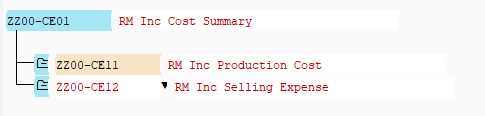
Operation Process:
| 1. | Enter the Description of the Cost element group. | ||
| 2. |  |
Position the cursor to the target Cost element group and click [Insert Cost element group on lower level]. (Ex. Lower level of 'ZZ00-CE01') |
|
| 3. | {{Cost Element Group}} | Enter any Cost element group. | |
| 4. | {Cost Element Group Description} | Enter the Description of the Cost element group. | |
| 5. |  |
Position the cursor to the target Cost element group and click [Insert Cost element group on same level]. (Ex. Same level of 'ZZ00-CE11') |
|
| 6. | {{Cost Element Group}} | Enter any Cost element group. | |
| 7. | {Cost Element Group Description} | Enter the Description of the Cost element group. | |
| 8. |  |
Click [Save]. |
Screen 3: Set Cost element group
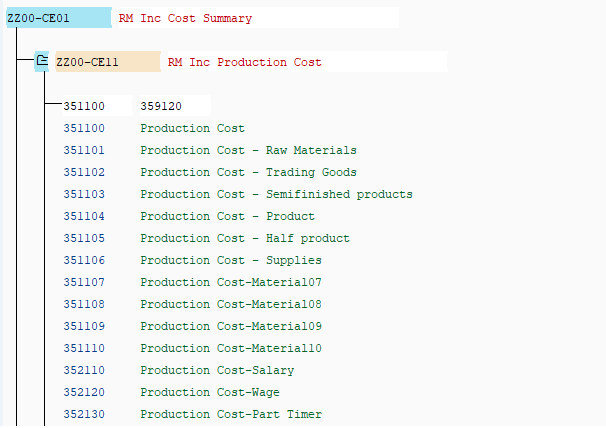
Operation Process:
| 1. |  |
Position the cursor to the target Cost element group and click [Insert Cost Element]. | |
| 2. | {{Cost Element}} | Enter the Cost element through range input or individually. When using range setting, enter the starting cost element and ending cost element. When setting multiple cost elements individually, enter the cost element one by one. |
|
| 3. | |
Click [Save]. |
Remarks:
| 1. | When [Enter] key is pressed after entering the Cost element, the cost elements to be grouped is displayed. |
Copyright(c) MITSUI KINZOKU YOURSOFT Inc.