Back to Menu No.02-02-01
Register Actual Cost Transfer Document (KB11N)
Menu: Accounting > Controlling > Cost Center Accounting > Actual Postings > Manual Reposting of Costs > Enter
Process Overview: Transfer the actual cost posted to Cost element from the Cost center to another Cost center.
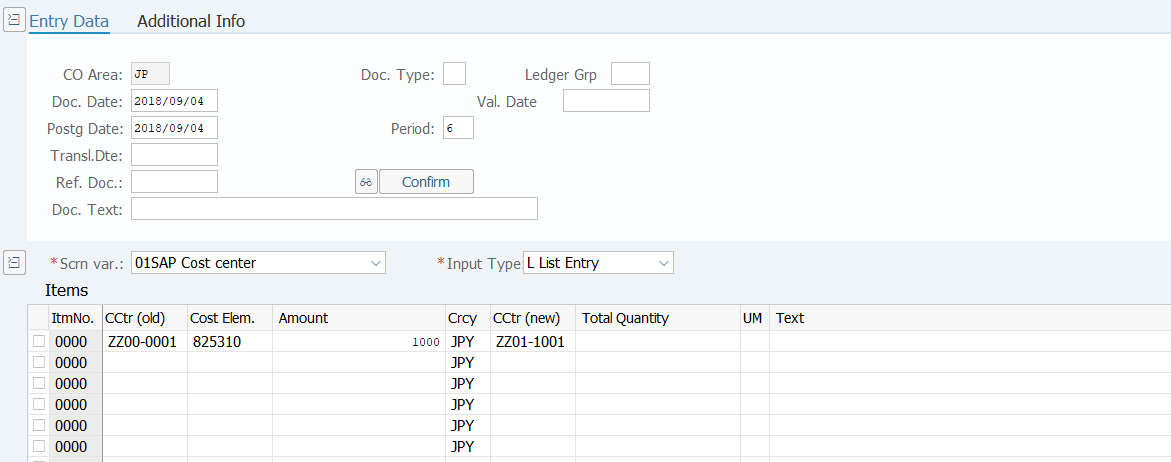
Screen 1:
Operation Process:
| 1. | {{Doc. Date}} | Enter any date. (Used as a substitute for memorandum) | |
| 2. | {{Postg Date}} | Enter the Posting Date. | |
| 3. | {Doc. Text} | Enter the Document header Text. | |
| 4. | {{Scrn var.}} | Select '01'(SAP Cost center). | |
| 5. | {{Input Type}} | Select 'L' (List Entry). | |
| Items | |||
| 6. | {{CCtr(old)}} | Enter the Cost Center for the sender (from). | |
| 7. | {{Cost Elem.}} | Enter the Cost Element number. | |
| 8. | {{Amount}} | Enter the transfer Amount. | |
| 9. | {{Crcy}} | Enter the Currency code for managing the item amount. | |
| 10. | {{CCtr(new)}} | Enter the Cost Center for the receiver (to). | |
| 11. | {Total Quantity} | Enter the Total transfer Quantity | |
| 12. | {UM} | Enter the quantity Unit. | |
| 13. | {Text} | Enter the item Text. | |
| 14. | Click [Enter]. | ||
| 15. |  |
Click [Post]. | |
Copyright(c) MITSUI KINZOKU YOURSOFT Inc.