Back to Menu No.03-01-05
Create Profit Center Group (KCH1)
Menu: Accounting > Controlling > Profit Center Accounting > Master Data > Profit Center Group > Create
Process Overview: Create Profit center group.
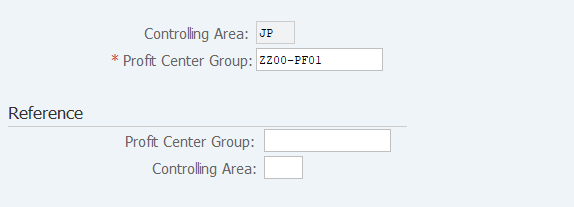
Screen 1:
Operation Process:
| 1. | {{Profit Center Group}} | Enter the Profit Center Group code to be registered. | |
| 2. |  |
Click [Enter]. |
Screen 2:
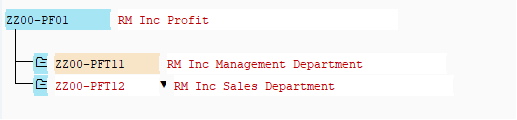
Operation Process:
| 1. | Enter the group name (text). | ||
| 2. |  |
Position the cursor to the target Profit Center Group and click [Insert Profit Center Group on lower level]. (Ex. Same level as ZZ00-PF01) | |
| 3. | {{Profit Center Group}} | Enter the target Profit Center Group. | |
| 4. | {Short Description} | Enter the name (text) of the Profit Center Group. | |
| 5. |  |
Position the cursor to the target Profit Center Group and click [Insert Profit Center Group on same level]. (Ex. Same level as ZZ00-PFT11) | |
| 6. | {{Profit Center Group}} | Enter the target Profit Center Group. | |
| 7. | {Short Description} | Enter the name (text) of the Profit Center Group. | |
| 8. |  |
Click [Save]. |
Screen3: Setting a Profit center
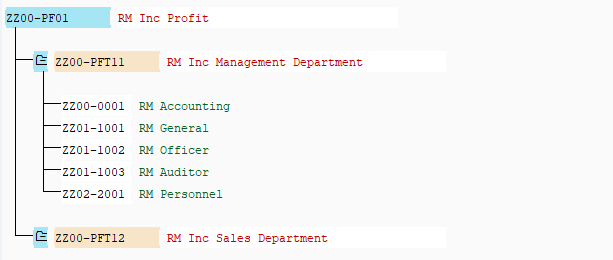
Operation Process:
| 1. |  |
Position the cursor to the target Profit Center Group and click [Insert Profit Center]. | |
| 2. | {{Profit Center}} | Enter the Profit Center by specifying the range or individually. When setting a range; enter the start and end Profit Centers. When setting multiple profit centers; enter the Profit Centers individually. |
|
| 3. | |
Click [Save]. |
Copyright(c) MITSUI KINZOKU YOURSOFT Inc.