Back to Menu No.03-01-01
Create Profit Center (KE51)
Menu: Accounting > Controlling > Profit Center Accounting > Master Data > Profit Center > Individual Processing > Create
Process Overview: Register a profit center. The profit center group must be linked to it.
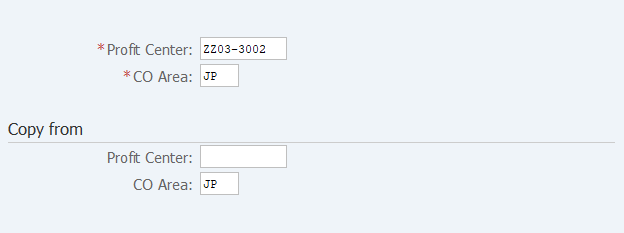
Screen 1:
Operation Process:
| 1. | {{Profit Center}} | Enter the Profit Center code to be registered. | |
| 2. | {{CO Area}} | Enter the Controlling Area. | |
| 3. |  |
Click [Master Data]. |
When Copying:
Copy from |
|||
| 1. | {Profit Center} | Enter the Profit Center when that is used as the copy source. | |
| 2. | {CO Area} | Enter the Controlling Area. | |
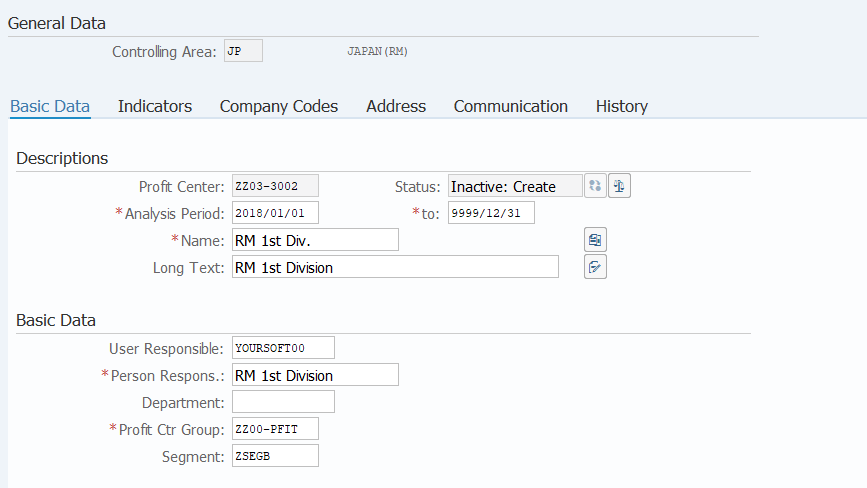
Screen 2:
Operation Process:
Descriptions |
|||
| 1. | {{Analysis Period}} {{to}} |
Enter the use starting date. Enter the use ending date. (Ex. If the date is unclear, enter '9999/12/31') |
|
| 2. | {{Name}} | Enter the Name (short) of the profit center. | |
| 3. | {{Long Text}} | Enter the name (long) of the profit center. | |
Basic Data |
|||
| 4. | {{User Responsible}} | Enter the name of the Person Responsible. | |
| 5. | {{Profit Ctr Group}} | Enter the Profit Center Group to which the Profit Center belongs. | |
| 6. | {Segment} | Enter the Segment. | |
| 7. |  |
Select [Company Codes] tab. | |
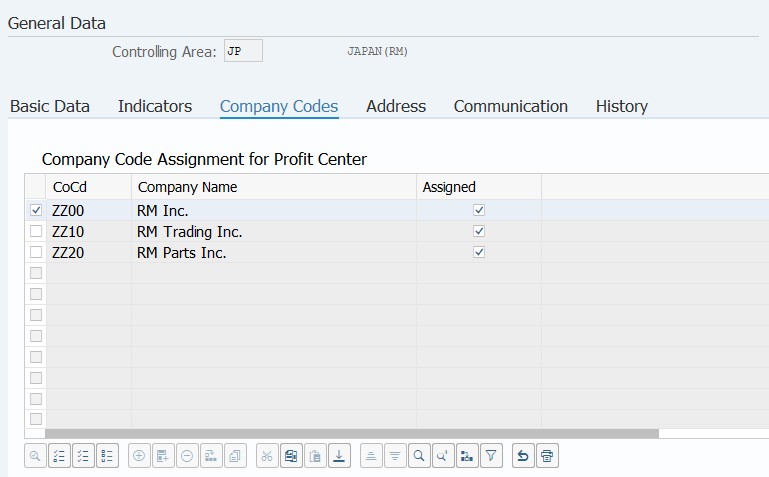
Screen 3:
Operation Process:
| 1. | {{Assigned}} | Tick the field of the Company Code to which the Profit Center belongs. | |
| 2. |  |
Click [Activate]. |
Copyright(c) MITSUI KINZOKU YOURSOFT Inc.