
Back to Menu No.03-01-02
Change Profit Center (KE52)
Menu: Accounting > Controlling > Profit Center Accounting > Master Data > Profit Center > Individual Processing > Change
Process Overview: Change Profit center.
(1) Information on how to implement time-dependent change management is available from here.
Screen 1:
Operation Process:
| 1. | {{Profit Center}} | Enter the Profit Center to be changed. | |
| 2. | {{CO Area}} | Enter the Controlling Area. | |
| 3. |  |
Click [Master Data]. |
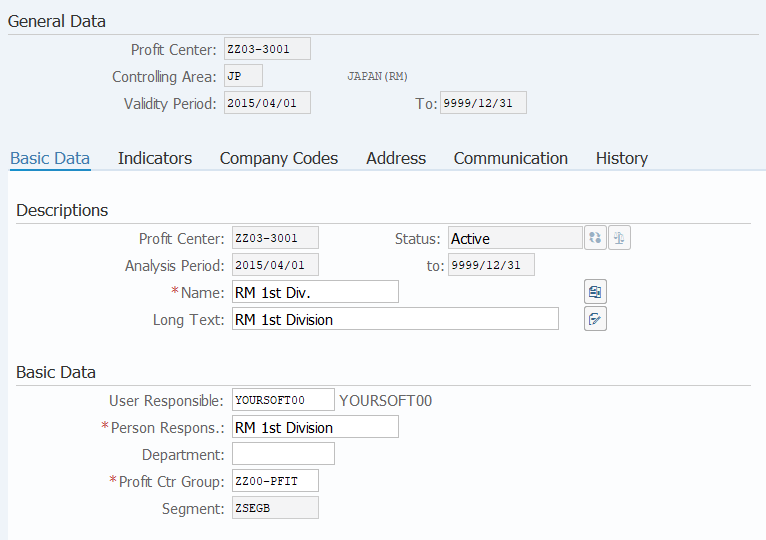
Operation Process:
| Descriptions | |||
| 1. | {{Name}} | Enter the name (short) of the Profit Center. | |
| 2. | {{Long Text}} | Enter the name (long) of the Profit Center. | |
| Basic Data | |||
| 3. | {{User Responsible}} | Enter the name of the Person Responsible. | |
| 4. | {{Profit Ctr Group}} | Enter the Profit Center Group to which the Profit Center belongs. | |
| 5. |  |
Click [Save as Inactive]. | |
| 6. |  |
Click [Activate]. | |
Remarks:
| 1. | The Enable icon is not displayed unless Disable is saved. |
(1)How to implement time-dependent change management
Screen (1)-1:
Operation Process:
| 1. | {{Profit Center}} | Enter the Profit Center to be changed. | |
| 2. | {{CO Area}} | Enter the Controlling Area. | |
| 3. |  |
Click [Master Data]. |
Screen (1)-2:
Operation Process:
| 1. |  |
Click [Set Analysis Period]. |
Screen (1)-3:
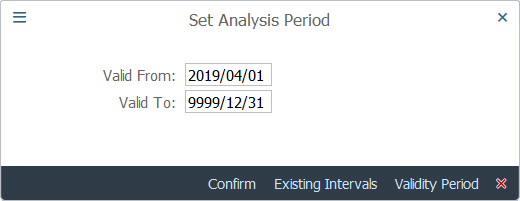
Operation Process:
| 1. | {{Valid From}} | Enter the start date for the analysis period. | |
| 2. | {{Valid To}} | Enter the end date for the analysis period. | |
| * If no specific end date is to be set, enter '9999.12.31'. | |||
| 3. |  |
Click [Confirm]. |
Screen (1)-4:
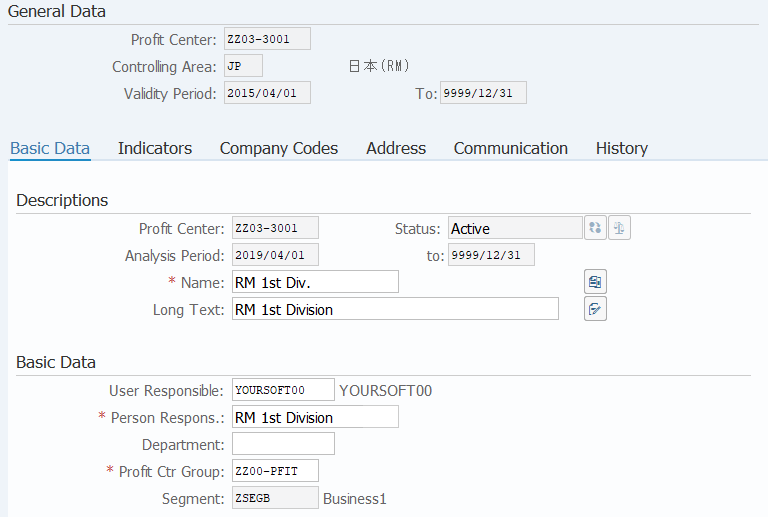
Operation Process:
| 1. | {User Responsible} | Change the Person Responsible. | |
| 2. | Change only the necessary part (Refer to Screen 2). | ||
| 3. | |
Click [Save as Inactive]. |
Remarks:
| 1. | Make sure to change the User Responsible. |
Screen (1)-5:
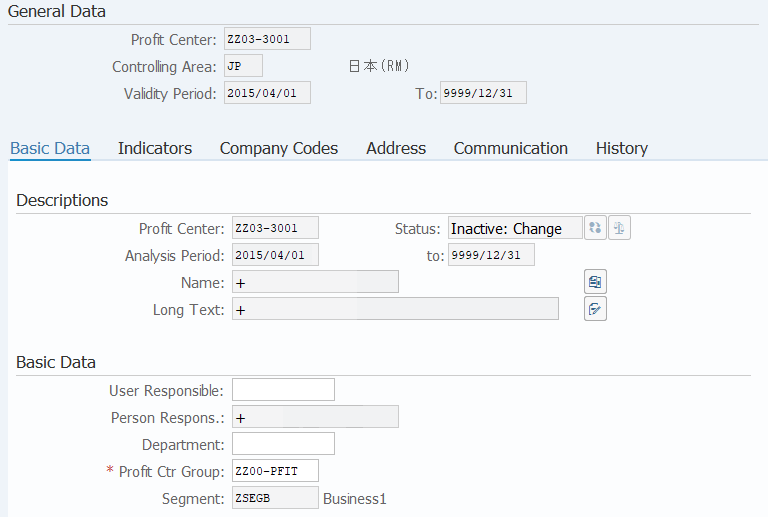
Operation Process:
| 1. | Verify that the changed fields are marked with '+'. | ||
| 2. | |
Click [Activate]. | |
Copyright(c) MITSUI KINZOKU YOURSOFT Inc.