Back to Menu No.03-03-01
Profit Center : Actual Line Items(KE5Z)
Menu: Accounting > Controlling > Profit Center Accounting > Information System > Reports for Profit Center Accounting > Line Item Reports > Profit Center: Actual Line Items
Process Overview: Display a list of actual line items of Profit center.
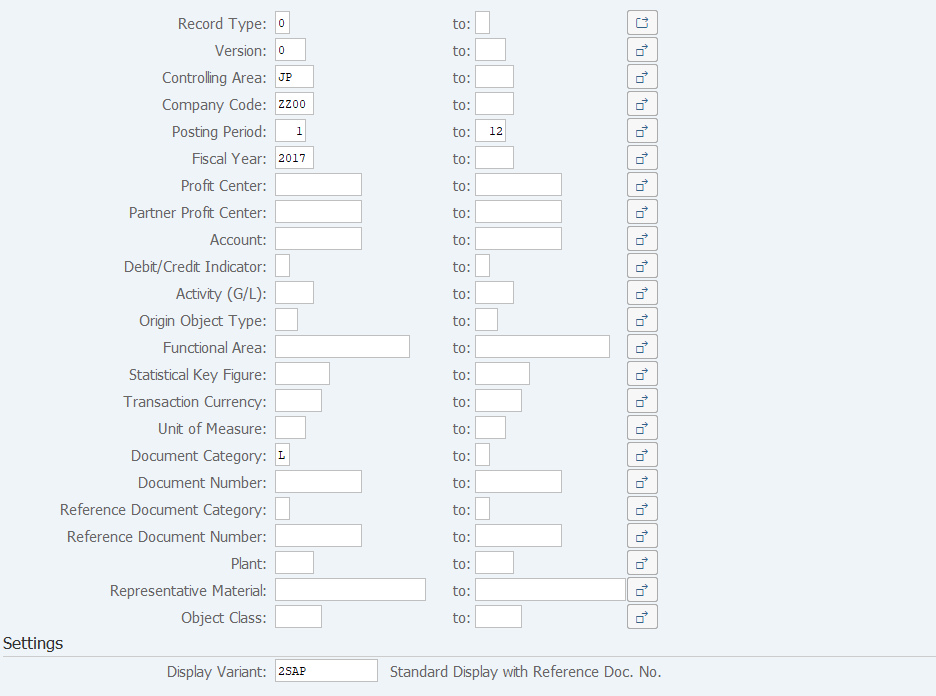
Screen 1:
Operation Process:
| 1. | {{Record Type}} | Enter the Record type. (Ex. 0: Actual 1: Plan, etc.) | |
| 2. | {{Version}} | Enter the Version. | |
| 3. | {{Controlling Area}} | Enter the Controlling Area. | |
| 4. | {{Company Code}} | Enter the Company Code. | |
| 5. | {{Posting Period}} | Enter the Posting Period. | |
| 6. | {{Fiscal Year}} | Enter the Fiscal Year. | |
| 7. | {{Document Category}} | Enter the Document Category. (Ex. L: Profit center actual transfer item, W: Item transferred from FI.) | |
| 8. | others | Enter any field as necessary. | |
| Settings | |||
| 9. | {{Display Variant}} | Enter '2SAP' (Standard display w/profit center doc.no.) | |
| 10. |  |
Click [Execute]. | |
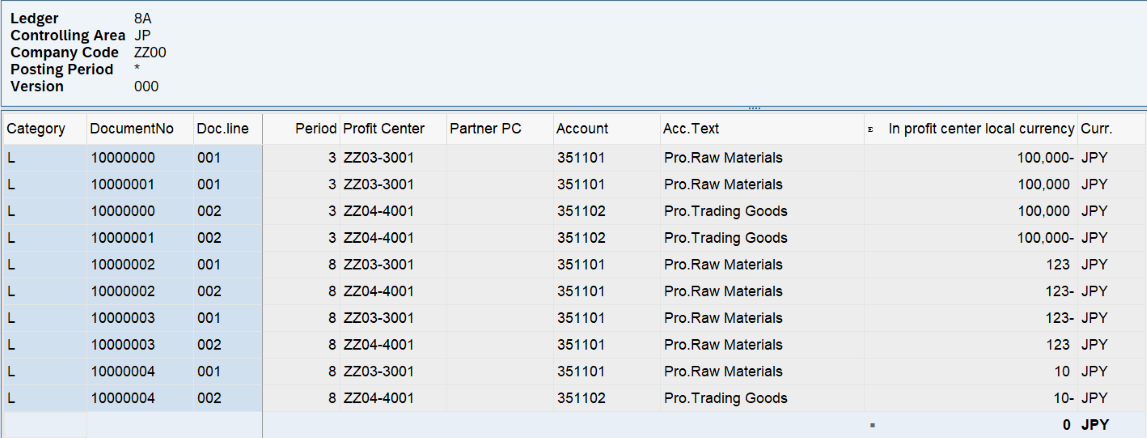
Screen 2:
Operation Process:
| 1. |   |
Sort: Select a target column and click [Sort in ascending order] or [Sort in descending order]. | |
| 2. |  |
Sub total: Select a target column and click [Subtotal]. | |
| 3. |  |
Click [Current Layout] and select a field to be displayed. |
Remarks:
| 1. | Drilldown (display of document overview) is enabled by double-clicking on the item. |
Copyright(c) MITSUI KINZOKU YOURSOFT Inc.