Back to Menu No.06-02-04
Displaying WIP (Single Processing) (KKAY)
Menu: Accounting > Controlling > Product Cost Controlling > Cost Object Controlling > Product Cost by Order > Period-End Closing > Single Functions > Work in Process > Individual Processing > Display
Process Overview: Display the WIP calculation results.
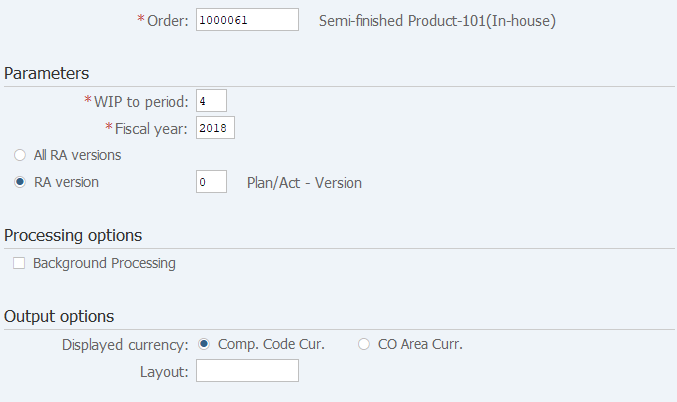
Screen 1:
Operation Process:
| 1. | {{Order}} | Enter the order number. | |
| Parameters | |||
| 2. | {{WIP to period}} | Enter the fiscal period. | |
| 3. | {{Fiscal year}} | Enter the fiscal year. | |
| 4. | {All RA versions} | Select this option if you want to include all results analysis versions in the processing. | |
| 5. | {RA version} | Select this option if you want to include a specific results analysis version in the processing. (Enter the version if selected.) |
|
| Processing options | |||
| 6. | {Background Processing} | Select this option if you want to output log in the background (job) and display the value of work in process in the log. | |
| 7. |  |
Click [Execute]. | |
Screen 2:
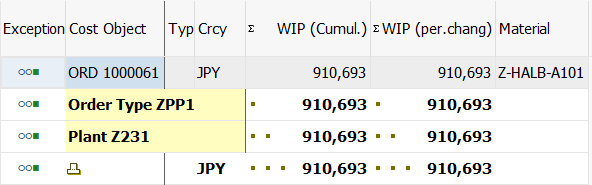
Operation Process:
| 1. | Check the WIP calculation results. |
Copyright(c) MITSUI KINZOKU YOURSOFT Inc.