Back to Menu No.02-01-09
Registering Activity Types (KL01)
Menu: Accounting > Controlling > Cost Center Accounting > Master Data > Activity Type > Individual Processing > Create
Process Overview: Create Activity type
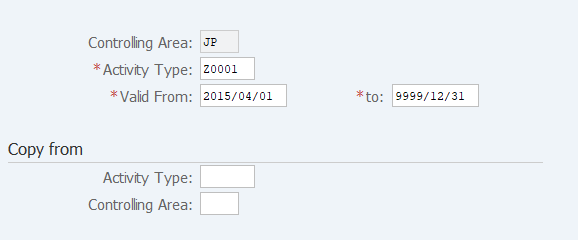
Screen 1:
Operation Process:
| 1. | {{Activity Type}} | Enter the activity type number. | |
| 2. | {{Valid From}} | Enter the start date of use. (Ex. '04.01' of current year in the usual case) | |
| 3. | {{to}} | Enter the end date of use. (Ex. '9999.12.31' in the usual case) | |
| Copy from | |||
| 4. | {Activity type} | Enter the activity type number of the copy source. (Same type is recommended) | |
| 5. | {Controlling Area} | Enter the controlling area to be used. | |
| 6. |  |
Click [Master Data]. | |
Screen 2:
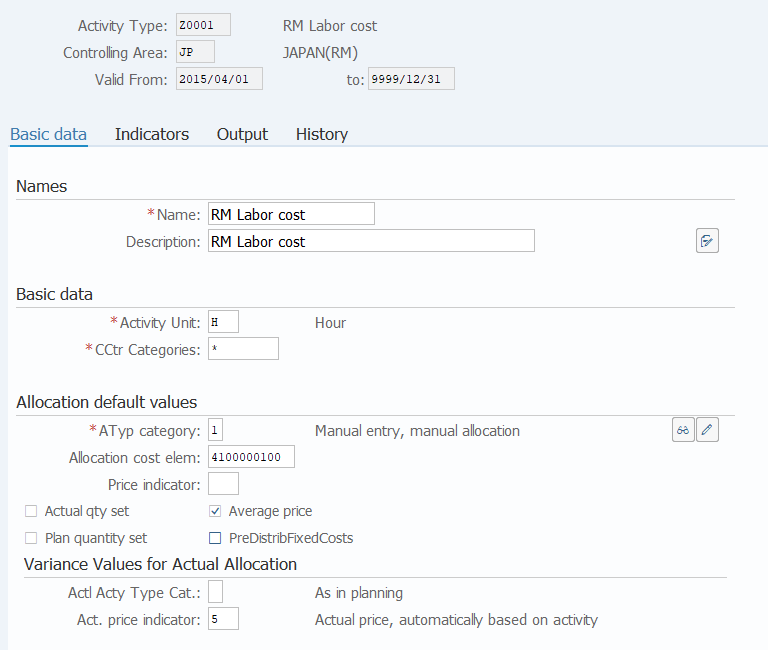
Operation Process:
| Names | |||
| 1. | {{Name}} | Enter the activity type name (short). | |
| 2. | {{Description}} | Enter the activity type name (long). | |
| Basic data | |||
| 3. | {{Activity Unit}} | Enter the time/quantity unit used to post activity quantity. | |
| 4. | {{CCtr Categories}} | Enter the cost center category. | |
| Allocation default values | |||
| 5. | {{ATyp category}} | Enter the planned activity quantity allocation method. (Ex. '1' Manual entry, manual allocation) | |
| 6. | {{Allocation cost elem}} | Enter the secondary cost element used for allocation of activity type. | |
| (Ex. In case of posting to production orders, select from 4100000100 ~ 4100000600, or posting to WBS elements, select 1100000100.) | |||
| 7. | {Price indicator} | Enter the method of calculating the planned activity cost. | |
| Variance Values for Actual Allocation | |||
| 8. | {Actl Acty Type Cat.} | Enter the actual activity quantity allocation method. (Ex. Blank (same as plan)) | |
| 9. | {Act. price indicator} | Enter the method to calculate actual activity cost. (Ex. '5' Actual price, automatically based on activity) | |
| 10. |  |
Click [Save]. | |
Copyright(c) MITSUI KINZOKU YOURSOFT Inc.