Back to Menu No.02-01-11
Locking Activity Types (KL02)
Menu: Accounting > Controlling > Cost Center Accounting > Master Data > Activity Type > Individual Processing > Change
Process Overview: Set the lock flag to Activity type.
Remarks: Even if Activity types are locked (not to be used), reports can be checked.
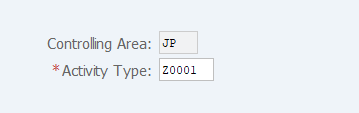
Screen 1:
Operation process:
| 1. | {{Activity Type}} | Enter the Activity type to be changed. | |
| 2. |  |
Click [Master Data]. |
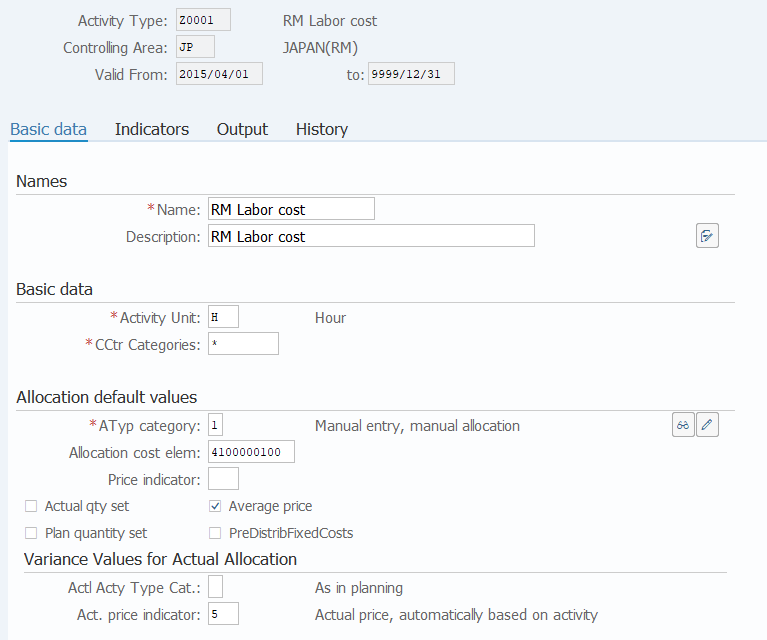
Screen 2:
Operation process:
| 1. |  |
Select the [Indicators] tab. |
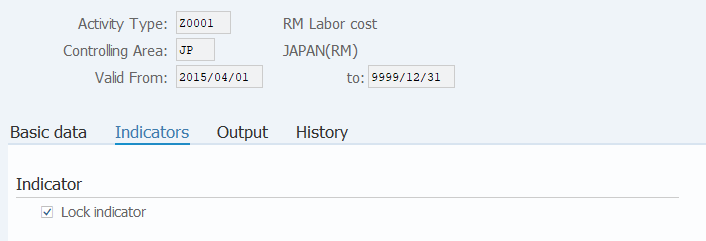
Screen 3:
Operation process:
| 1. | {{Lock indicator}} | Tick. | |
| 2. |  |
Click [Save]. |
Copyright(c) MITSUI KINZOKU YOURSOFT Inc.