Back to Menu No.04-01-01
Create Internal Order (KO01)
Menu: Accounting > Controlling > Internal Orders > Master Data > Special Functions > Order > Create
Process Overview: Create an Internal Order.
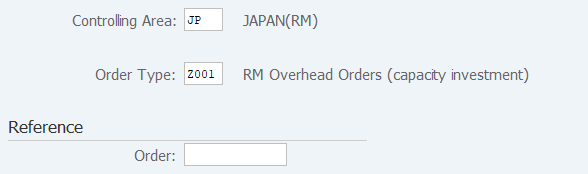
Screen 1:
Operation Process:
| 1. | {{Order Type}} | Enter the Order Type. | |
| 2. |  |
Click [Master Data]. |
Screen 2:
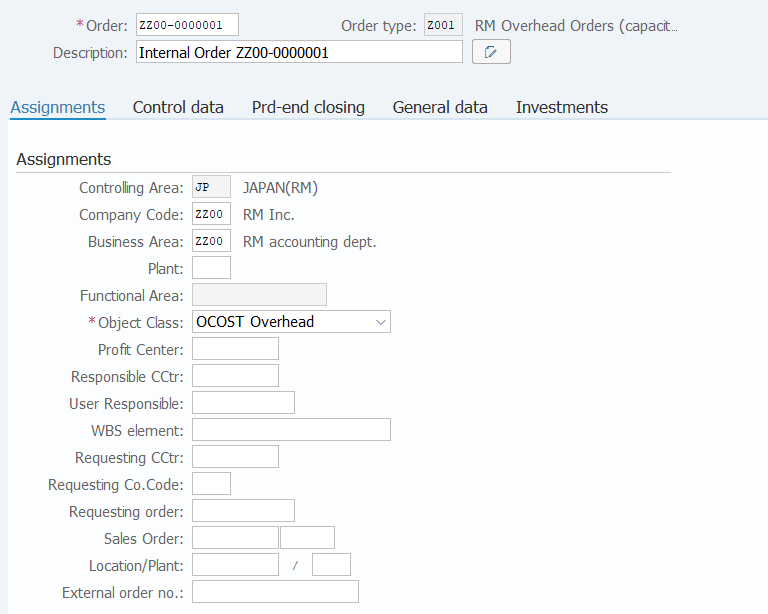
Operation Process:
| 1. | {{Order}} | Enter the Order number. | |
| 2. | {{Description}} | Enter the Description of the Order. | |
| Assignments | |||
| 3. | {{Company Code}} | Enter the Company Code for managing the order. | |
| 4. | {{Business Area}} | Enter the Business Area for managing the order. | |
| 5. | Other fields | Enter any field as necessary. | |
| 6. |  |
Click [Save]. | |
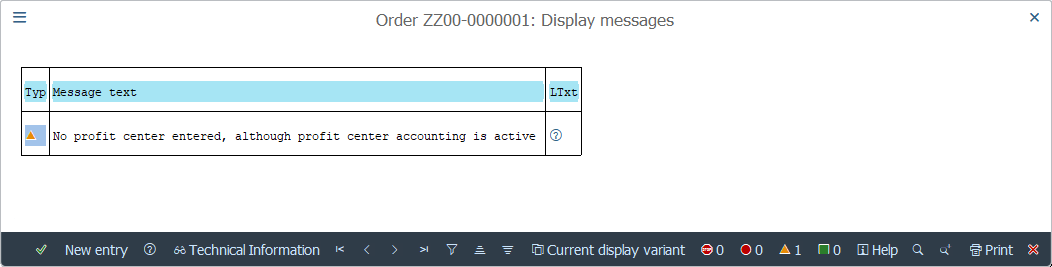
Remarks:
| 1. |  |
The following warning message is displayed at saving. Save the data by click [Enter]. |
Copyright(c) MITSUI KINZOKU YOURSOFT Inc.