
Back to Menu No.04-01-06
Change Order Group (KOH2)
Menu: Accounting > Controlling > Internal Orders > Master Data > Order Group > Change
Process Overview: Change (add, delete, or remove) of the Internal Order group.
Screen 1:
Operation Process:
| 1. | {{Order Group}} | Enter the Order Group code to be displayed. | |
| 2. |  |
Click [Enter]. |
Processes:(1) New Creation (2)Remove (3)Deletion
(1) New Creation (Ex. Creating "ZZ00-OR016 at the same level as "ZZ00-OR015")
Screen (1)-1:
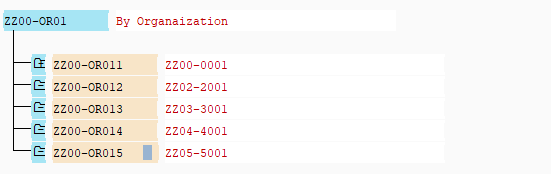
Operation Process:
| 1. | Position the cursor to the level to be registered. (Ex.'ZZ00-OR015') | ||
| 2. |  |
Click [Same Level]. | |
| 3. | {{Order Group}} | Enter the Order Group code of the Group of the same level. (Ex.'ZZ00-OR016') | |
| 4. | {Short Description} | Enter the name (text) of the Group of the same level. (Ex.'ZZ06-6001') |
Screen (1)-2:
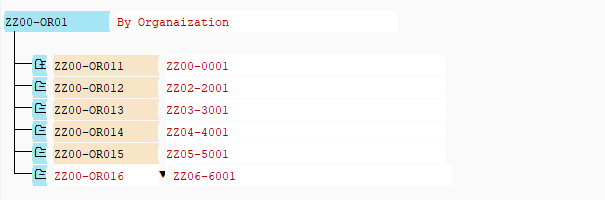
Operation Process:
| 1. |  |
Click [Save] when a Order group is added. |
(2) Remove (Ex. Remove "ZZ00-OR016" from &"ZZ00-OR01")
Screen (2)-1:
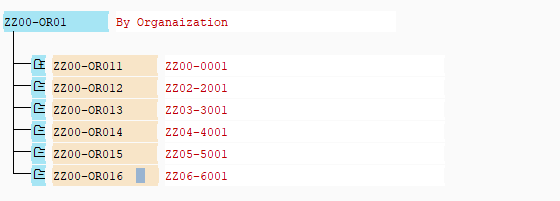
Operation Process:
| 1. | Position the cursor to the target Internal Order Group. (Ex.'ZZ00-OR016') | ||
| 2. |  |
Click [Select]. | |
| 3. |  |
Click [Remove]. |
Remarks:
| 1. | Selecting [Remove] removes only the relevant Order Group within the current hierarchy. | |
| 2. | If not saved after remove, the remove will be cancelled. |
(3) Deletion (Ex. Deleting ZZ00-OR016)
Screen (3)-1:
Operation Process:
| 1. | Position the cursor to the target Order Group. (Ex.'ZZ00-OR016') | ||
| 2. | |
Click [Select]. | |
| 3. |  |
Click [Delete]. |
Screen (3)-2:
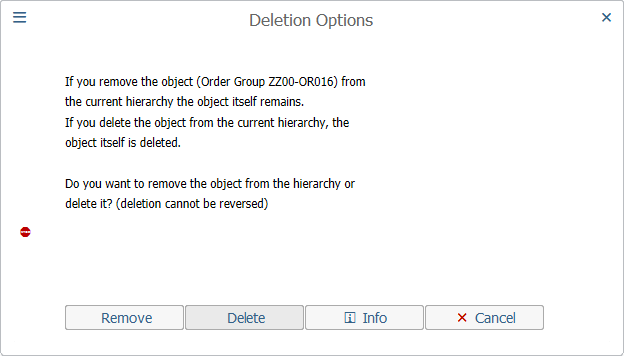
Operation Process:
| 1. |  |
Click [Delete]. | |
| 2. | |
Click [Save]. |
Remarks:
| 1. | Selecting [Delete] deletes the relevant Order Group from all order groups. | |
| 2. | Once the deletion is processed, it cannot be reversed. |
Copyright(c) MITSUI KINZOKU YOURSOFT Inc.