Back to Menu No.02-03-01
Register/Change Cost Center Budget (KP06)
Menu: Accounting > Controlling > Cost Center Accounting > Planning > Cost and Activity Inputs > Change
Process Overview: Register plan value by the Cost center or the Cost element. Values can be registered either annually or periodically.
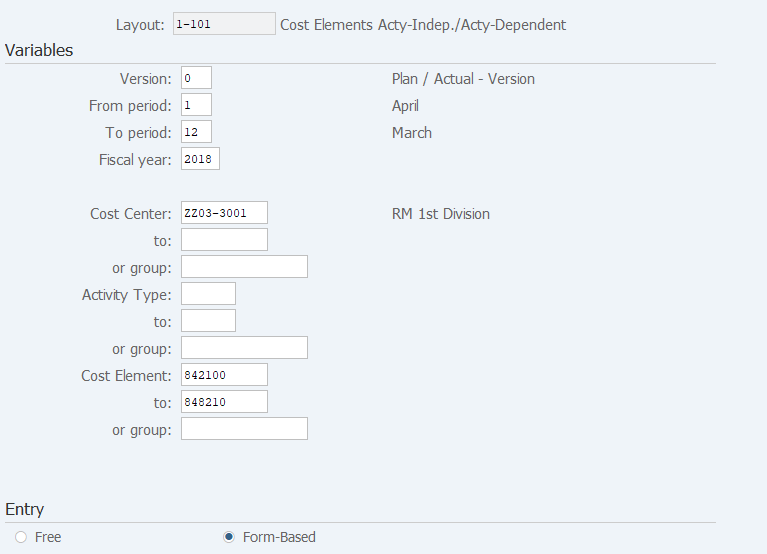
Screen 1:
Operation Process:
| Variables | |||
| 1. | {{Version}} | Enter the '0'. | |
| 2. | {{From period}} | Enter the plan start period. | |
| 3. | {{To period}} | Enter the plan end period. | |
| 4. | {{Fiscal year}} | Enter the plan Fiscal year. | |
| 5. | {{Cost Center}} or {{group}} |
Enter the Cost Center or Cost Center group. | |
| 6. | {{Cost Element}} or {{group}} |
Enter the Cost Element or Cost Element group. | |
| Entry | |||
| 7. | {{Entry}} | Tick 'Form base'. | |
| 8. |  |
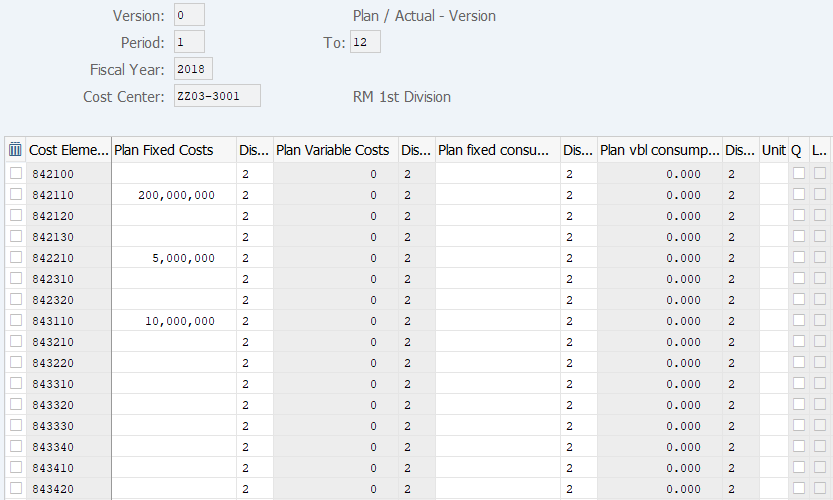
Click [Overview Screen] to access the screen from which you can enter the cumulative total. To Screen 2 | |
| 9. |  |
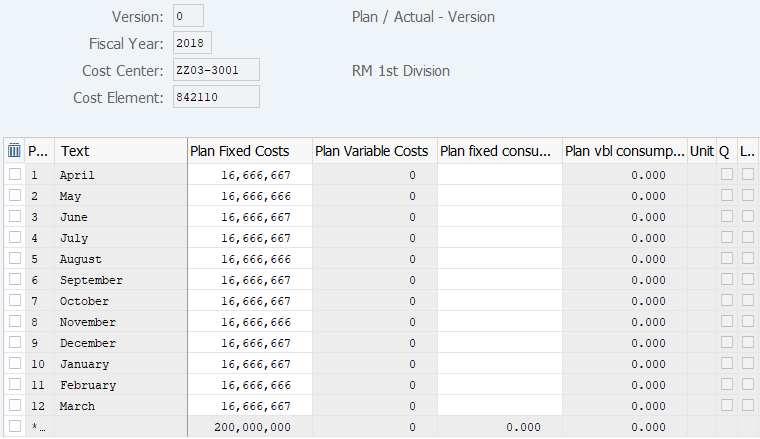
Click [Period Screen] to access the screen from which you can enter periodic plan value. To Screen 3 | |
Operation Process:
| 1. | {{Plan Fixed Costs}} | Enter the planned amount. | |
| 2. | {Plan Fixed consumpt} | Enter the planned quantity. | |
| 3. | {Unit} | Enter the quantity unit. | |
| 4. | Press [Enter] key. (The total amount will be displayed.) | ||
| 5. |  |
Click [Post]. |
Supplement:
| 1. | Screen 3 is Overview Screen. | ||
| 2. | |
Select the item and click [Period Screen] to move to the screen from which you can enter a periodic plan. | |
| 3. |   |
Click [Previous Combination] or [Next Combination] to move to the previous or next Cost center. (When more than one Cost center is specified) |
Operation Process:
| 1. | {{Plan Fixed Costs}} | Enter the planned amount. | |
| 2. | {Plan fixed consumpt} | Enter the planned quantity. | |
| 3. | Press [Enter] key to display the total amount. | ||
| 4. | |
Click [Post]. |
Supplement:
| 1. | Screen 2 is Period Screen. | ||
| 2. | |
Click [Overview Screen] to access the screen from which you can enter the cumulative total. | |
| 3. |   |
Click [Previous Combination] or [Next Combination] to move to the previous or next Cost element. |
Copyright(c) MITSUI KINZOKU YOURSOFT Inc.