Back to Menu No.04-03-01
Enter Planning Cost Elements/Internal Order (KPF6)
Menu: Accounting > Controlling > Add: Function > Change CElem/Activity Input Planning
Process Overview: Register planned value to Internal order per Cost element.
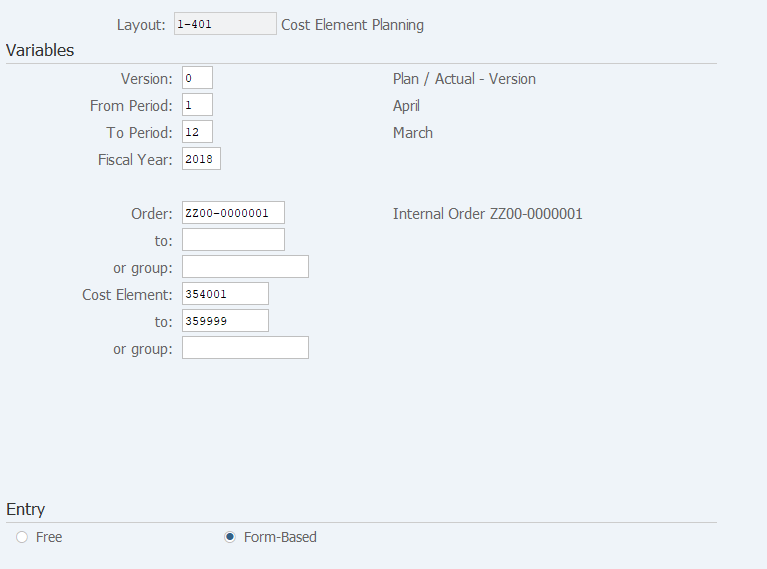
Screen 1:
Operation Process:
| Variables | |||
| 1. | {{Version}} | Enter the Version. (Ex. Normally, enter '0') | |
| 2. | {{From Period}} | Enter the start Period. | |
| 3. | {{To Period}} | Enter the end Period. | |
| 4. | {{Fiscal Year}} | Enter the Fiscal Year. | |
| 5. | {{Order}} or | Enter the Order number or the Order group. | |
| {{group}} | |||
| 6. | {{Cost Element}} or | Enter the Cost Element or the Cost Element group. | |
| {{group}} | |||
| Entry | |||
| 7. | {{Form-Based}} | Select 'Free' or 'Form-based'. (Ex. Normally, 'Form-Based') | |
| 8. |  |
Click [Overview Screen] to access the screen from which you can enter the cumulative total. To Screen 2 | |
| 9. |  |
Click [Period Screen] to access the screen from which you can enter periodic plan value. To Screen 3 | |
Operation Process:
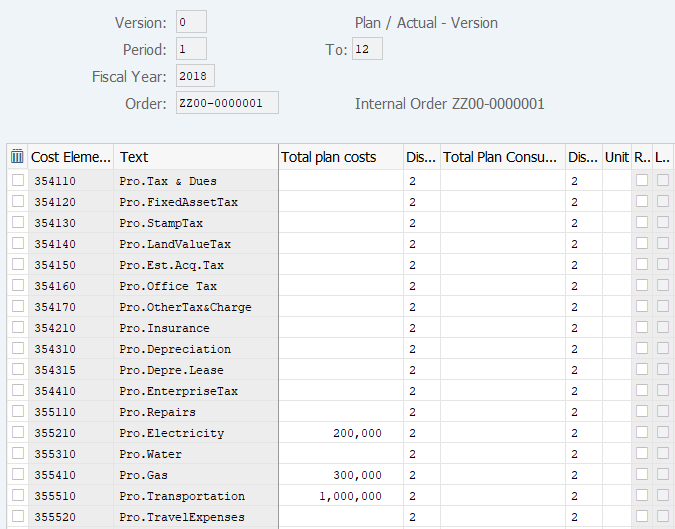
| 1. | {{Total plan costs}} | Enter the Total budget amount according to the period by Cost element. | |
| 2. | {{Distribution key}} | Enter the Distribution key, by which the Total plan cost is distributed. | |
| 3. | Press [Enter] key to display the total amount. | ||
| 4. |  |
Click [Save]. |
Supplement:
| 1. | Screen 2 is Overview Screen. | ||
| 2. | |
Select the item and click [Period Screen] to move to the screen from which you can enter a periodic plan. | |
| 3. |   |
Click [Previous Combination] or [Next Combination] to move to the previous or next Order. (when more than one Order is specified) |
Operation Process:
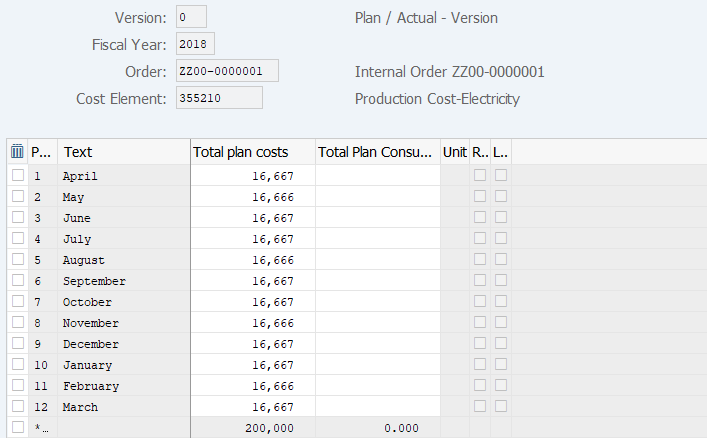
| 1. | {{Total plan costs}} | Enter the Total plan amount by period. | |
| 2. | Press [Enter] key to display the total amount. | ||
| 3. | |
Click [Save]. |
Supplement:
| 1. | Screen 3 is Period Screen. | ||
| 2. | |
Click [Overview Screen] to access the screen from which you can enter the cumulative total. | |
| 3. | |
Click [Previous Combination] or [Next Combination] to move to the previous or next account. |
Copyright(c) MITSUI KINZOKU YOURSOFT Inc.