Back to Menu No.02-01-01
Create Cost Center (KS01)
Menu: Accounting > Controlling > Cost Center Accounting > Master Data > Cost Center > Individual Processing > Create
Process Overview: Create Cost center.
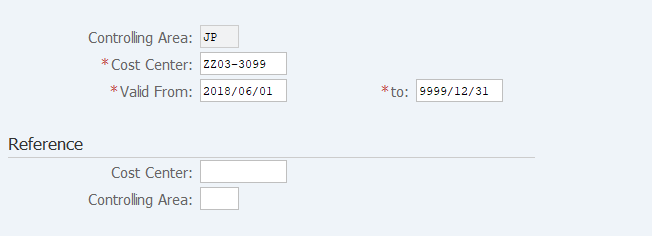
Screen 1:
Operation Process:
| 1. | {{Cost Center}} | Enter the Cost Center. | |
| 2. | {{Valid From}} | Enter the use start date. | |
| 3. | {{Valid to}} | Enter the use end date. (Ex. If the date is unclear, enter '9999.12.31') | |
| Reference | |||
| 4. | {Cost Center} | Enter the copy source Cost center. | |
| 5. | {Controlling Area} | Enter the copy source Controlling Area. | |
| 6. | Press [Enter] key. | ||
Screen 2:
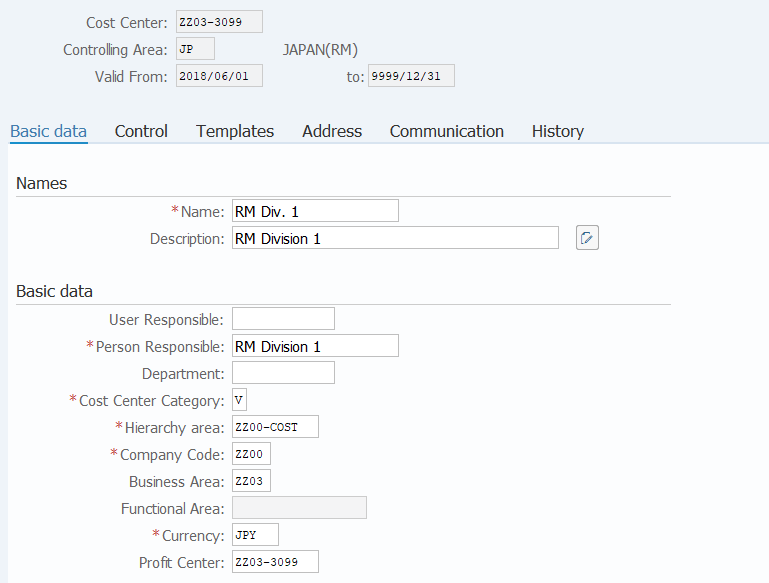
Operation Process:
| Names | |||
| 1. | {{Name}} | Enter the name of the Cost Center (short). | |
| 2. | {{Description}} | Enter the Description of the Cost Center (long). | |
| Basic data | |||
| 3. | {User Responsible} | Enter the ID of the User Responsible for the Cost Center. | |
| 4. | {{Person Responsible}} | Enter the name of the Person Responsible. | |
| 5. | {Department} | Enter the name of the Department. | |
| 6. | {{Cost Center Category}} | Enter the category of the Cost Center. | |
| 7. | {{Hierarchy area}} | Enter the cost center group to which the Cost Center belongs. | |
| 8. | {{Company Code}} | Enter the Company Code. | |
| 9. | {{Business Area}} | Enter the Business Area. | |
| 10. | {{Currency}} | Enter the Currency code. | |
| 11. | {{Profit Center}} | Enter the Profit Center corresponding to the Cost Center. (Representative entry is allowed.) | |
| 12. |  |
Click [Save]. | |
Remarks:
| 1. | If Depreciation costs transfer (YRFI0022) in Financial Accounting (FI) is to be used, make sure to register one of the cost center categories listed below. | |
| The account numbers to be transferred in the individual cost center categories are as follows: |
| Cost center category | Transfer destination for depreciation |
| L (Management) | 824310 (Administrative Expense-Depreciation) |
| V (Sales) | 844310 (Selling Expense-Depreciation) |
| C (Engineering works) | 134310 (Construction Cost-Depreciation) |
Copyright(c) MITSUI KINZOKU YOURSOFT Inc.