Back to Menu No.02-01-05
Cost Centers: Master Report (KS13)
Menu: Accounting > Controlling > Cost Center Accounting > Information System > Reports for Cost Center Accounting > Master Data Indexes > Cost Centers: Master Data Report
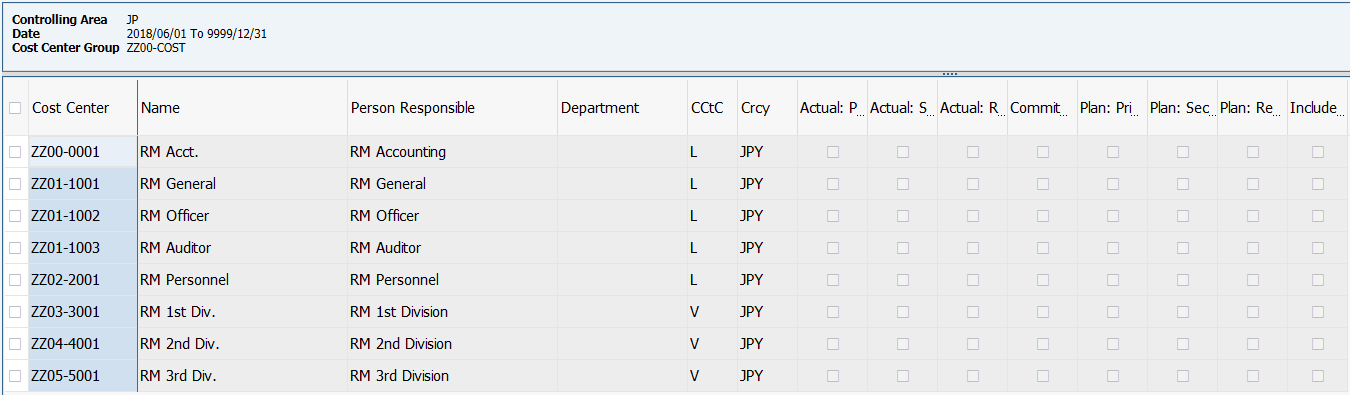
Process Overview: Display the Cost ceneter list.
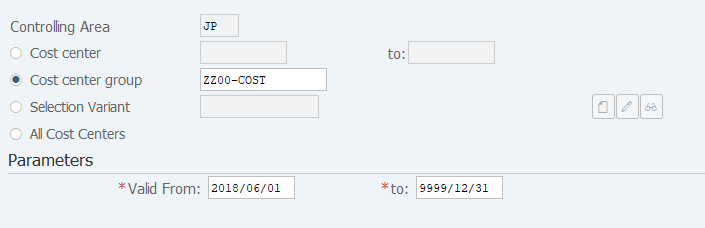
Screen 1:
Operation Process:
| 1. | {Cost center} | Enter the Cost center. | |
| 2. | {Cost center group} | Enter the Cost center group. | |
| 3. | {Selection Variant} | Enter the Selected Variant. | |
| 4. | {All Cost Centers} | Tick this option when targeting all Cost Centers. | |
| Parameters | |||
| 5. | {{Valid From}} | Enter the Valid start date of the cost center. | |
| 6. |  |
Click [Execute]. | |
Remarks:
| 1. | Select one of the Operation Process 1 to 4. |
Screen 2:
Copyright(c) MITSUI KINZOKU YOURSOFT Inc.