Back to Menu No.01-02-01
CO Document Actual Costs (KSB5)
Menu: Accounting > Controlling > Cost Element Accounting > Information System > Reports for Cost and Revenue Element Accounting (New) > Document Display > Controlling Documents: Actual Costs
Process Overview: Display a list of actual Controlling document.
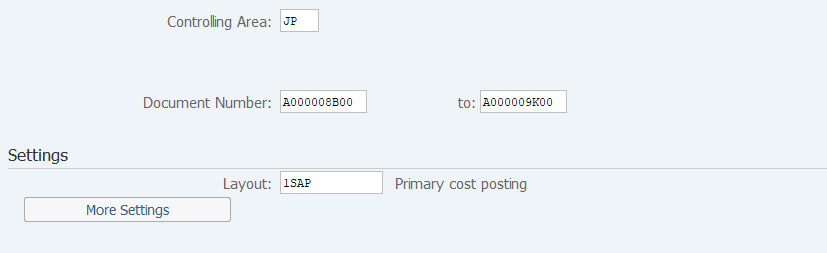
Screen 1:
Operation Process:
| 1. | {{Controlling Area}} | Enter the Controlling Area. | |
| 2. | {{Document Number}} | Enter the Document Number to be displayed. | |
| 3. |
 |
Click [Execute]. To Screen 3 |
Supplement:
| 1. | If the Document Number is unclear, position the cursor on the field of
the Document Number, and click  [Search Matching].
To Screen 2 [Search Matching].
To Screen 2 |
|
| 2. | By click
 , various search conditions can be added. , various search conditions can be added. |
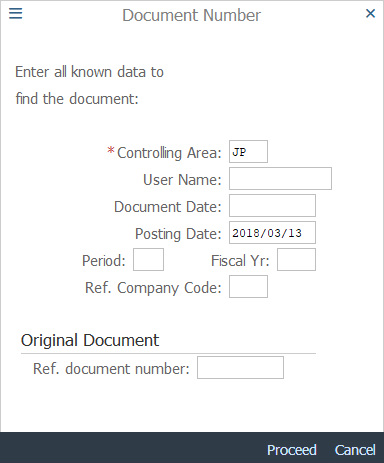
Operation Process:
| 1. | Enter any field as necessary. | ||
| 2. |  |
Click [Proceed]. |
Remarks:
| 1. | Enter the either [Document Date] or [Posting Date]. |
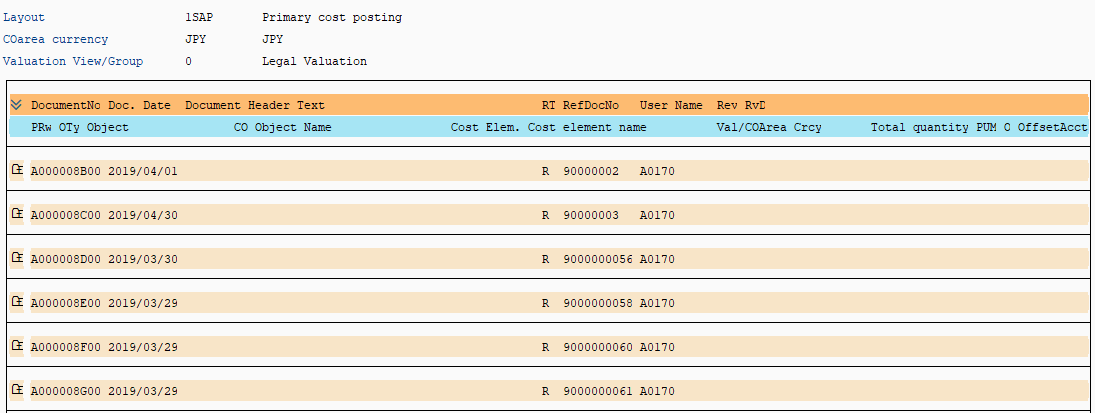
Supplement:
| 1. | Drill-down to the source
document is enabled. Position the cursor on the document
number line and click  . . |
|
| 2. | By click
 , the cost element that was transferred can be checked. , the cost element that was transferred can be checked. |
Copyright(c) MITSUI KINZOKU YOURSOFT Inc.