Back to Menu No.02-05-05
Cost Center: Plan Line Items (KSBP)
Menu: Accounting > Controlling > Cost Center Accounting > Information System > Reports for Cost Center Accounting > Line Items > Cost Centers : Plan Line Item
Process Overview: Display a list of planning line item by the Cost center.
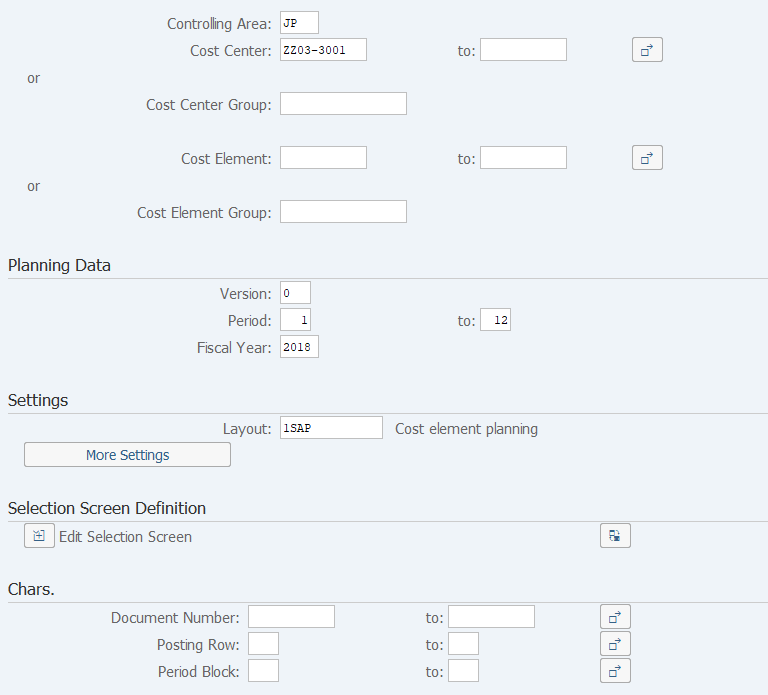
Screen 1:
Operation Process:
| 1. | {Cost Center} or {Cost Center Group} |
Enter the Cost Center or Cost Center Group to be referenced. | |
| 2. | {Cost Element} or Cost Element Group} |
Enter the Cost Element or Cost Element Group to be referenced. | |
| Planning Data | |||
| 3. | {{Version}} | Enter '0'(Plan/Actual Version). | |
| 4. | {{Period}} | Enter the Period to be references. | |
| 5. | {{Fiscal Year}} | Enter the Fiscal Year to be referenced. | |
| Settings | |||
| 6. | {{Layout}} | Select layout code to be displayed. | |
| 7. |  |
Click [Execute]. | |
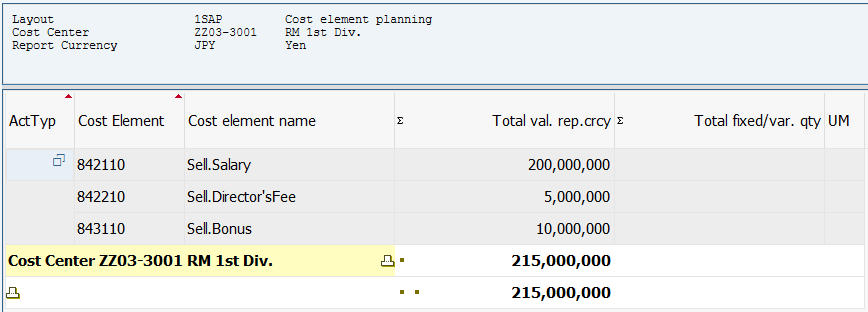
Screen2:
Copyright(c) MITSUI KINZOKU YOURSOFT Inc.