Back to Menu No.02-04-07
Distribution - Create Cycle (KSV1)
Menu: Accounting > Controlling > Cost Center Accounting > Period-End Closing > Single Functions > Allocations > Distribution
Process Overview: Create the Cycle for actual distribution.
Remarks: Since Tr_Cd:KSV1 is not available in the menu, enter from Tr_Cd:KSV5.
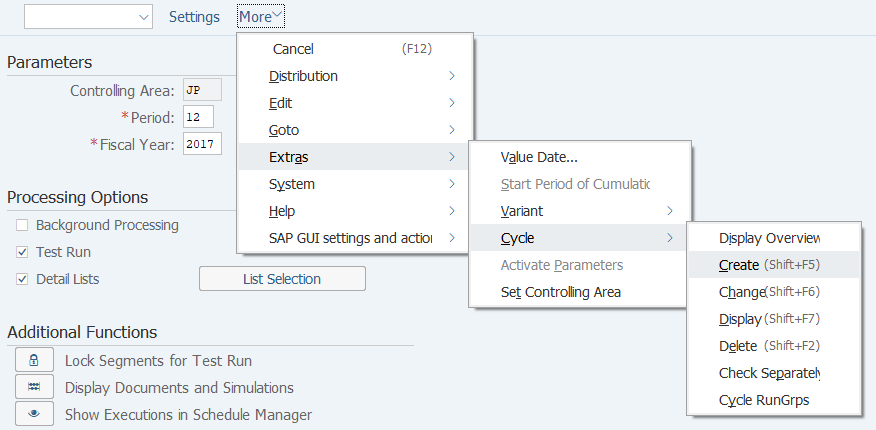
Screen 1: Move to the entry screen for Cycle master of Actual Distribution.
Operation Process:
| 1. | Menu: Extras > Cycle > Create |
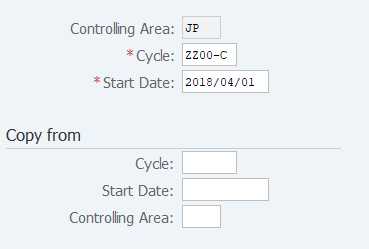
Screen 2: Enter Cycle master code & valid-from date.
Operation Process:
| 1. | {{Cycle}} | Enter the Cycle code. | |
| 2. | {{Start Date}} | Enter the cycle use Start Date. | |
| 3. |
 |
Click [Execute]. |
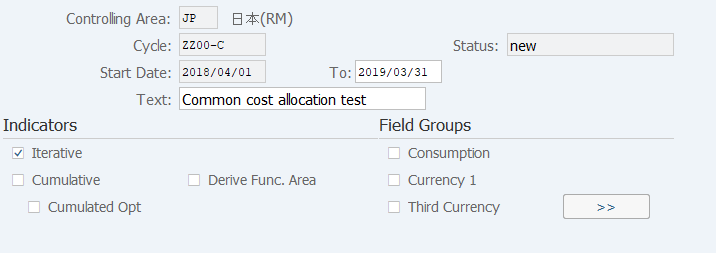
Screen 3: Enter the description of Cycle master & valid-to date.
Operation Process:
| 1. | {{To}} | Enter the use end date. | |
| 2. | {{Text}} | Enter the cycle name. | |
| 3. |
 |
Click [Attach segment]. |
Screen 4: Create Cycle master by its Segment. Select the distribution rule such as Sender, Receiver.
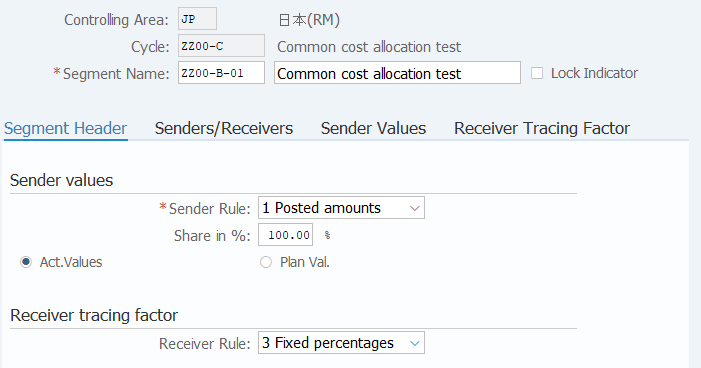
Operation Process:
| 1. | {{Segment}} | Enter the Segment number. | |
| 2. | {{Segment Name}} | Enter the Segment name. | |
|
Sender values |
|||
| 3. | {{Sender rule}} | Select 'Posted amounts'. | |
| 4. | {{Share in %}} | Enter the distribution rate. | |
| 5. | {{Act. vals}} | Select 'Act. vals'. | |
|
Receiver tracing factor |
|||
| 6. | {{Receiver rule}} | Select 'Distribution rule'. (Ex. Variable portions, Fixed amounts, Fixed percentages, Fixed portions) | |
| 7. |
 |
Select [Senders/Receivers] tab. | |
Remarks:
| 1. | The screen or tab varies according to the receiver rule of the receiver trace factor. | |
| The screen that is displayed is the one when 'Receiver rule: Fixed percentages' is selected. |
Screen 5 : Enter Sender information, Receiver information.
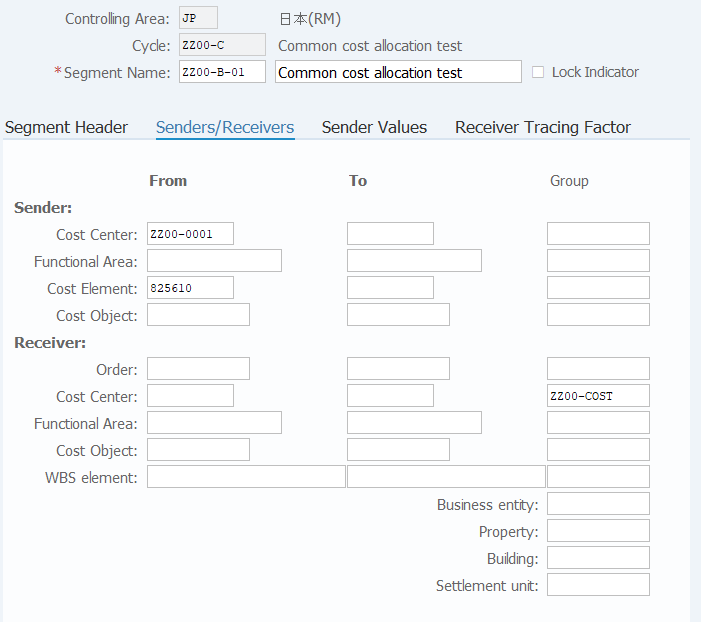
Operation Process:
|
Sender |
|||
| 1. | {{Cost Center}} | Enter the Cost Center or Cost Center Group of the sender (from). | |
| 2. | {{Cost Element}} | Enter the Cost Element or Cost Element Group of the sender (from) | |
|
Receiver |
|||
| 3. | {Cost Center} | Enter the Cost Center or Cost Center Group of the receiver (to). | |
| 4. | {Cost Object} | Enter the Cost Object of the receiver (to). | |
| 5. | {WBS Element} | Enter the WBS Element or WBS Element group of the receiver (to). | |
| 6. |
 |
Select [Receiver Tracing Factor] tab. | |
Remarks:
| 1. | Selection of a receiver Order, a Cost center, or a WBS element is mandatory. |
Screen 6: Enter distribution percentage rate of the Receiver.
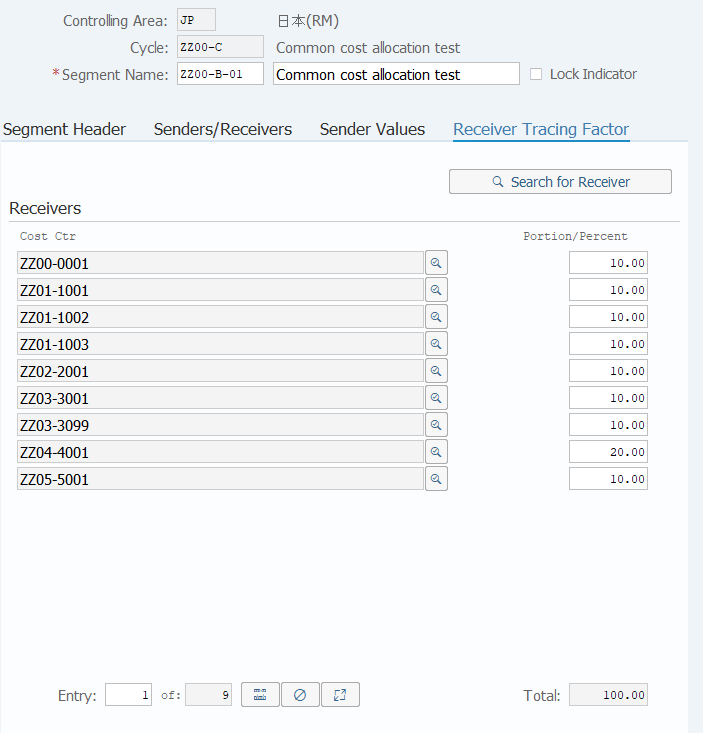
Operation Process:
| 1. | {{Portion/percent}} | Enter the distribution rate. | |
| 2. |
 |
Click [Save Without Check]. |
Remarks:
| 1. | The screen or tab varies according to the receiver rule of the receiver trace factor. | |
| The screen that is displayed is the one when 'Receiver rule: Fixed percentages' is selected. |
Copyright(c) MITSUI KINZOKU YOURSOFT Inc.