Back to Menu No.02-04-09
Distribution - Reverse (KSV5)
Menu: Accounting > Controlling > Cost Center Accounting > Period-End Closing > Single Functions > Allocations > Distribution
Process Overview: Cancel actual distribution processing.
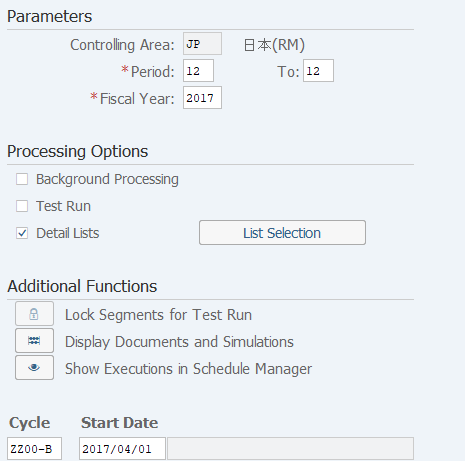
Screen 1:
Operation Process:
| Parameters | |||
| 1. | {{Period}} | Enter the distribution execution start Period. | |
| 2. | {{To}} | Enter the distribution execution end Period. | |
| 3. | {{Fiscal Year}} | Enter the distribution Fiscal Year. | |
| Parameters | |||
| 4. | {{Test Run}} | Uncheck. | |
| 5. | {{Cycle}} | Enter the execution Cycle. | |
Screen 2:
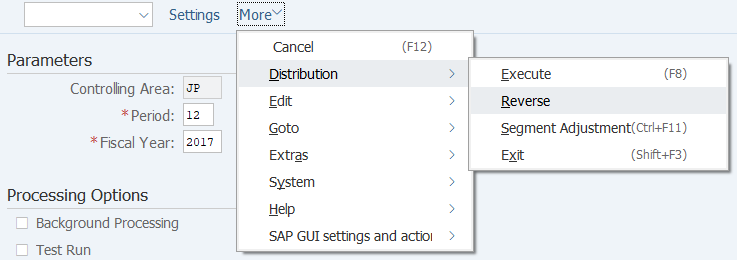
Operation Process:
| 1. | Menu: Distribution > Reverse |
Screen 3:
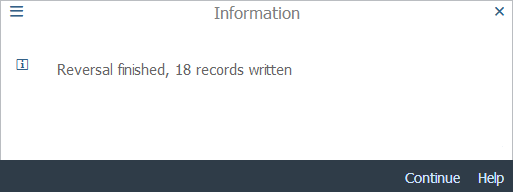
Operation Process:
| 1. |  |
Check the message and click [Continue]. |
Copyright(c) MITSUI KINZOKU YOURSOFT Inc.