Back to Menu No.06-05-02
Cost Component of Price (MLCCSPD)
Menu: Accounting > Controlling > Product Cost Controlling > Actual Costing/Material Ledger > Information System > Detailed Reports > Cost Components for Price
Process Overview: Display the cost component information of the material.
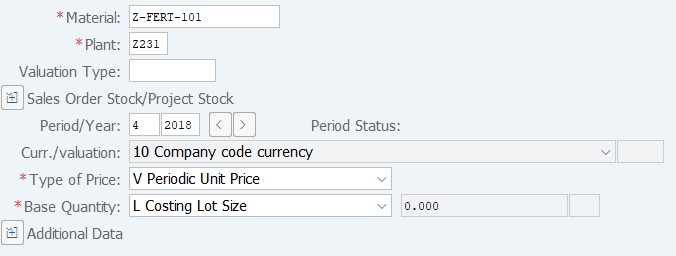
Screen 1:
Operation Process:
| 1. | {{Material}} | Enter the Material number. | |
| 2. | {{Plant}} | Enter the Plant. | |
| 3. | {{Period/Year}} | Enter the Fiscal Year/Period. | |
| 4. | {{Type of Price}} | Select the Pricing type. (Ex. 'Standard Price', 'V Periodic Unit Price') | |
| 5. | {{Base Quantity}} | Select the Base Quantity for report display. ('L Costing lot size') | |
| 6. | Press [Enter] key. |
Screen 2:
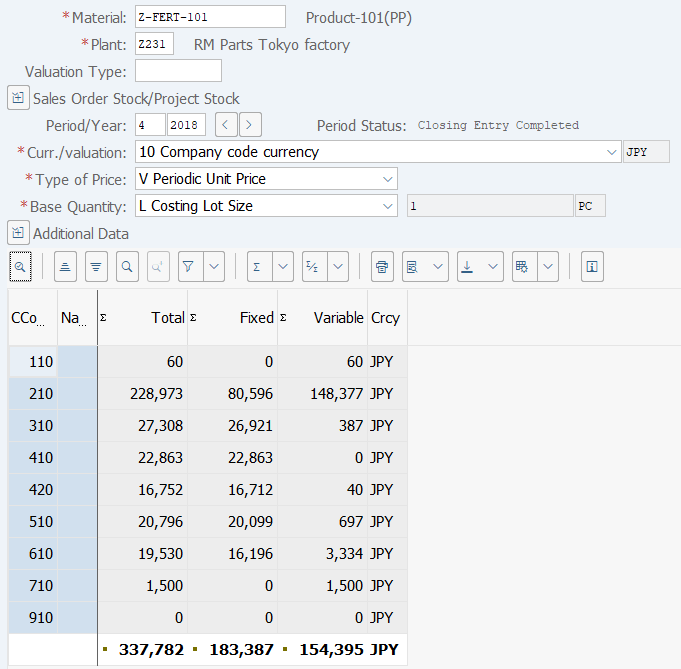
Operation Process:
| 1. | Details of cost components are displayed according to the selected pricing type and base quantity. |
Copyright(c) MITSUI KINZOKU YOURSOFT Inc.