Back to Menu No.04-05-02
Orders: Actual/Plan/Variance (S_ALR_87012993)
Menu: Accounting > Controlling > Internal Orders > Information System > Reports for Internal Orders > Plan/Actual Comparisons > Orders: Actual/Plan/Variance
Process Overview: Display a list of actual / plan / difference amount of Internal Order items.
Screen 1:
Operation Process:
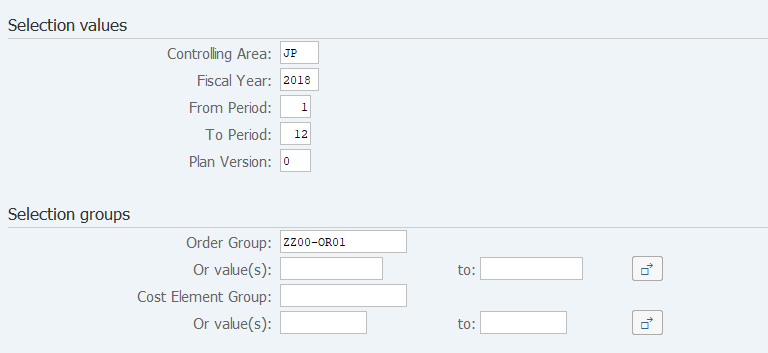
| Selection values | |||
| 1. | {{Controlling Area}} | Enter the target Controlling Area. | |
| 2. | {{Fiscal Year}} | Enter the target Fiscal Year. | |
| 3. | {{From Period}} | Enter the target starting fiscal Period. | |
| 4. | {{To Period}} | Enter the target ending fiscal Period. | |
| 5. | {{Plan Version}} | Enter '0'(Plan/Actual Version) . | |
| Selection groups | |||
| 6. | {Order Group} or | Enter the target Order Group or Order. | |
| {Or value(s)} | |||
| 7. | {Cost Element Group} or | Enter the target Cost Element Group or Cost Element. | |
| {Or value(s)} | |||
| 8. |  |
Click [Execute]. | |
Screen 2:
Operation Process:
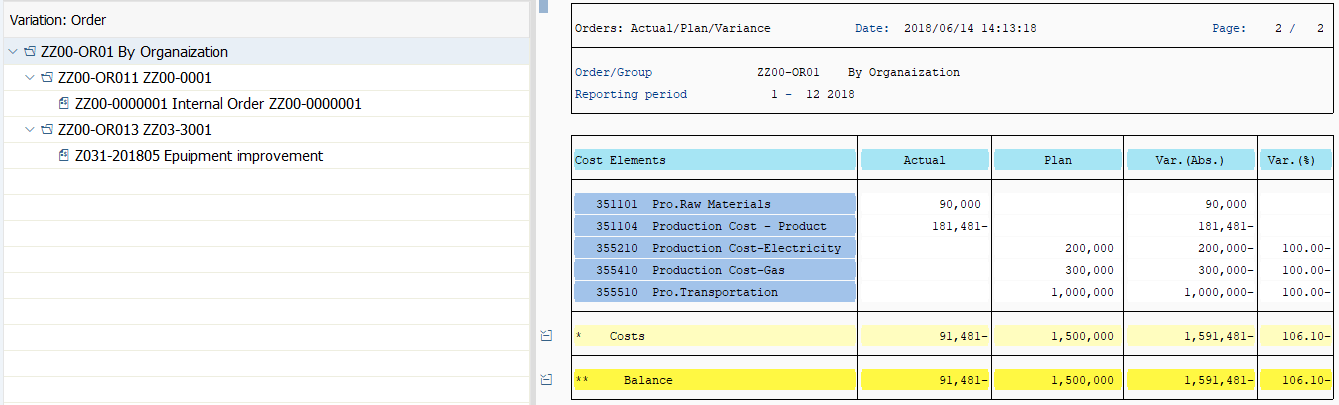
| 1. | More > Goto > Scroll horizontal | To move column right and left. ([To the far left], [Page left], [Page Right], [To the far Right]) | |
| 2. |  |
To display a hierarchy of Internal order group. [Navigation on/off] | |
| 3. | More > Goto > Variation | To change hierarchy level. ([Variation Previous level], [Variation left], [Variation right], [Variation next level]) | |
| 4. | More > View > Expand section, Collapse section | To expand section or collapse. | |
| 5. | More > Setting > Column attributes | To change column width. (After putting a cursor on any column, select the menu pass.) | |
| 6. |  |
To display the other report. ([Call up report]) (After selecting a specifying amount column, click the button.) | |
| 7. |  |
To replace the list by Excel Sheet. ([Options / Office Integration]) |
Remarks:
| 1. | Enable to drill-down by double-cricking a specifying line. |
Copyright(c) MITSUI KINZOKU YOURSOFT Inc.