Back to Menu No.06-05-03
Order Selection (S_ALR_87013127)
Menu: Accounting > Controlling > Product Cost Controlling > Cost Object Controlling > Product Cost by Order > Information System > Reports for Product Cost by Order > Object List > Order Selection
Process Overview: Display a list of planned costs/actual costs of orders.
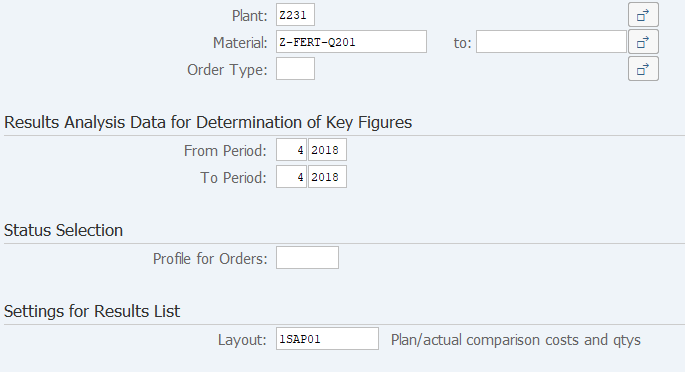
Screen 1:
Operation Process:
| 1. | {Plant} | Enter the plant. | |
| 2. | {Material Number} | Enter the material number. | |
| 3. | {Order Type} | Enter the order type. | |
|
Results Analysis Data for Determination of Key Figures |
|||
| 4. | {{From Period}} | Enter the start fiscal period. | |
| 5. | {{to Period}} | Enter the end fiscal period. | |
| 6. |  |
Click [Execute]. | |
Screen 2:

Operation Process:
| 1. | Check the contents. |
Copyright(c) MITSUI KINZOKU YOURSOFT Inc.