
Back to Menu No.06-02-09
Actual Cost Component Split (SE38)
Process Overview: Split the amounts recorded in Orders into cost component.
Screen 1:
Operation Process:
| 1. | {{Transaction code}} | Enter 'transaction code: SE38'. |
Screen 2:
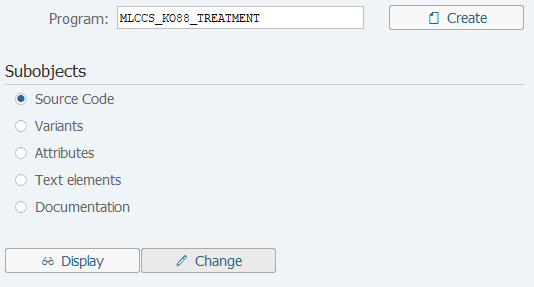
Operation Process:
| 1. | {{Program}} | Enter program: 'MLCCS_KO88_TREATMENT'. | |
| 2. |  |
Click [Execute]. |
Screen 3:
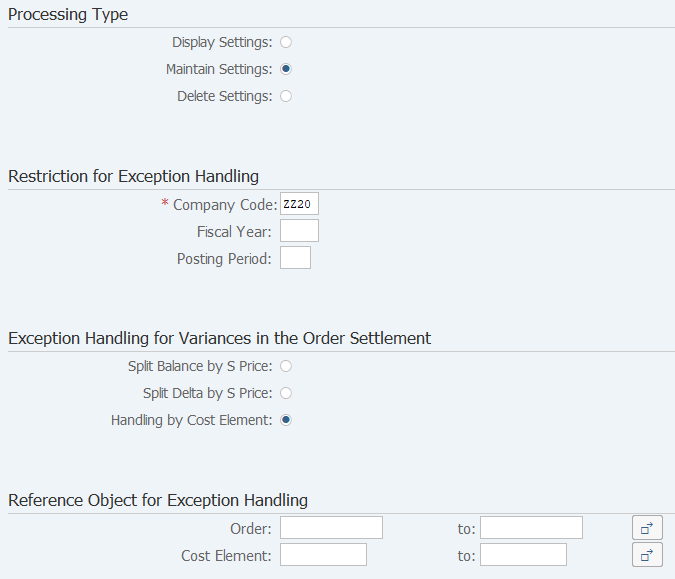
Operation Process:
Processing Type |
|||
| 1. | {Maintain Settings} | Select this. | |
Restriction for Exception Handling |
|||
| 2. | {Company Code} | Enter the Company code. | |
| 3. | {Fiscal Year} | Enter the Fiscal year. | |
| 4. | {Posting period} | Enter the Fiscal period. | |
Exception Handling for Variances in the Order Settlement |
|||
| 5. | {Split Balance by S Price} | Select this option to split the total balance of the order in which the material is settled according to the standard price component of receiver material. | |
| 6. | {Split Delta by S Price} | Select this option to split the variance amount of the order in which the material is settled according to the standard cost component of receiver material. | |
| 7. | {Handling by Cost Element} | Select this option to split by cost element all the costs for which no cost component split is determined. | |
Reference Object for Exception Handling |
|||
| 8. | {Order} | Enter the Order number. | |
| 9. | {Cost Element} | Enter the Cost element. | |
| 10. |  |
Click [Execute]. | |
Screen 4:
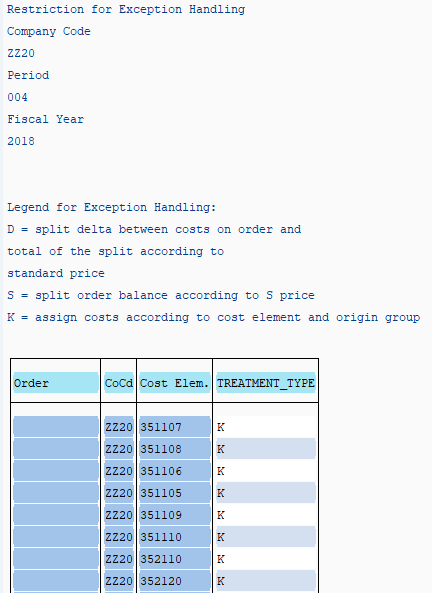
Operation Process:
| 1. | Check the execution results. |
Copyright(c) MITSUI KINZOKU YOURSOFT Inc.