Back to Menu No.02-06-02
Cost Difference Stock Reevaluation balance check (YRCO0013)
Menu: Accounting > Controlling > Add: Download > Cost Difference Stock Reevaluation balance check
Process Overview: Download account item data of Cost difference and Stock revaluation.
Screen 1:
Operation Process:
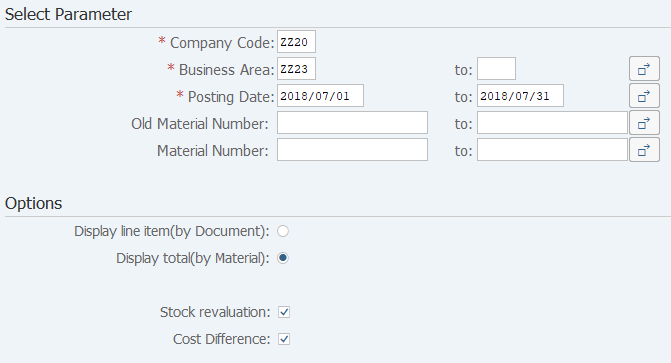
Select Parameter |
|||
| 1. | {{Company Code}} | Enter the target Company Code. | |
| 2. | {{Business Area}} | Enter the target Business Area. | |
| 3. | {{Posting Date}} | Enter the target Posting Date. | |
| 4. | {Old Material Number} | Enter the target Old Material Number. | |
| 5. | {Material Number} | Enter the target Material Number. | |
Options |
|||
| 6. | {Display line item (by Document)} | Tick this option when displaying line item (by Document). | |
| 7. | {Display total (by Material)} | Tick this option when displaying total amount (by Material). | |
| 8. | {Stock revaluation} | Tick this option when targeting 'Stock revaluation' account documents.. | |
| 9. | {Cost Difference} | Tick this option when targeting 'Cost Difference' account documents. | |
| 10. |  |
Click [Execute]. | |
Remarks:
| 1. | Two account numbers are targeted for downloading, "stock reevaluation" and "cost difference". |
Screen 2:
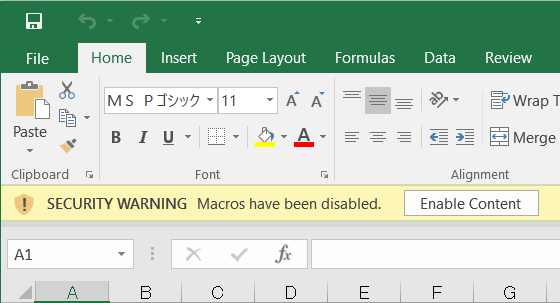
Operation Process:
| 1. |  |
Click [Enable Content]. |
Screen 3:
Display line item (by Document):

Display total (by Material):

Copyright(c) MITSUI KINZOKU YOURSOFT Inc.