List of Cost Center Data (YRCO0037)
Menu: Accounting > Controlling > Add: Download > List of Cost Center Data
Process Overview: Download actual data of Cost center with the Cost center master data.
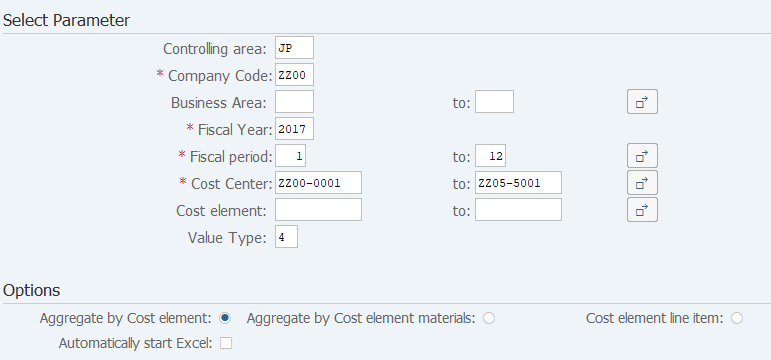
Screen 1:
Operation Process:
| Select Parameter | |||
| 1. | {{Controlling area}} | Enter the Controlling area. | |
| 2. | {{Company Code}} | Enter the Company Code. | |
| 3. | {Business Area} | Enter the Business Area. | |
| 4. | {{Fiscal Year}} | Enter the Fiscal Year. | |
| 5. | {Fiscal period} | Enter the Fiscal period. | |
| 6. | {Cost Center} | Enter the Cost Center. | |
| 7. | {Cost element} | Enter the Cost Element. | |
| 8. | {Value Type} | Enter the Value Type. *If you don't enter it, the Value Type is to be '4'. |
|
| Options | |||
| 9. | {{Collect by Cost element}}
or {{Collect by Cost element materials}} or {{Cost element line item}} |
Select the summation unit of output data. | |
| 10. | {Automatically start Excel} | Tick this option when starting an Excel file automatically. | |
| 11. |  |
Click [Execute]. | |
Screen 2:
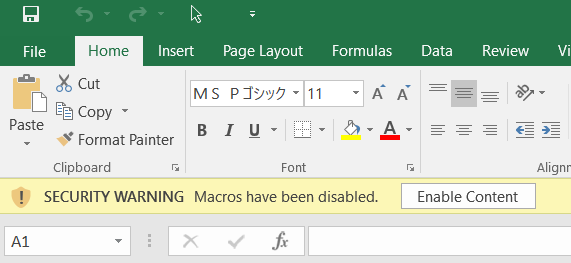
Operation Process:
| 1. |
 |
Click [Enable Content]. |
Screen 3:

Copyright(c) MITSUI KINZOKU YOURSOFT Inc.