Back to Menu No.06-06-01
List of Inventory Write-Down Information (YRCO0047)
Menu Pass: Accounting > Controlling > Add: Download > List of Inventory Write-Down Information
Process Overview: Download the summary/detailed information of the devaluation process history and plan.
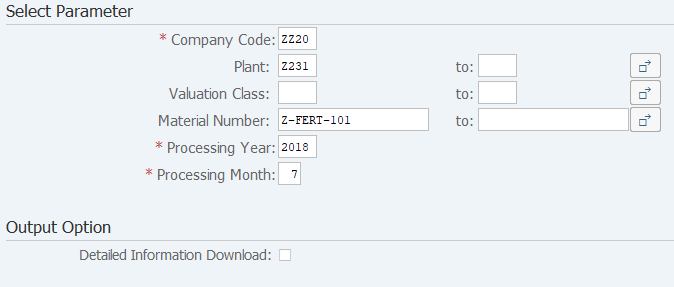
Screen 1:
Operation Process:
| Select Parameter | |||
1. |
{{Company Code}} | Enter the Company Code that processes it. | |
2. |
{Plant} | Enter the Plant that processes it. | |
3. |
{Valuation Class} | Enter the Valuation Class that processes it. | |
4. |
{Material Number} | Enter the Material Code that processes it. | |
5. |
{{Processing Year}} | Enter the Processing Year that processes it. | |
6. |
{{Processing Month}} | Enter the Processing Month that processes it. | |
| Output Option | |||
7. |
{Detailed Information Download} | When detailed information is downloaded, it ticks it. | |
8. |
 |
Click [Execute]. | |
Screen 2:
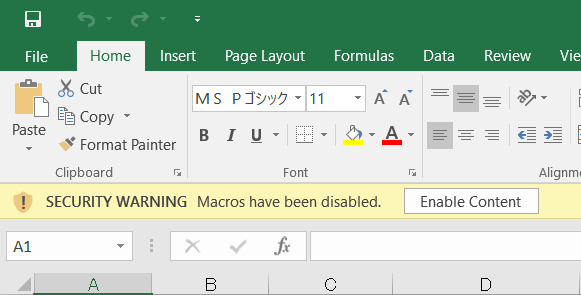
Operation Process:
| 1. |  |
Click [Enable Content]. |
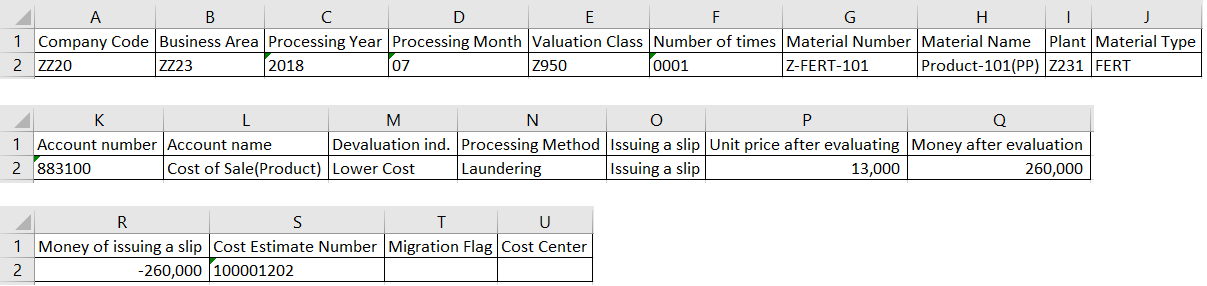
Screen 3:

Screen 4: When you tick Detailed Information Download.
Copyright(c) MITSUI KINZOKU YOURSOFT Inc.