Back to Menu No.03-04-01
Profit Center Report by period (YRCO0R10)
Menu: Accounting > Controlling > Add: Report > Profit Center Report by period
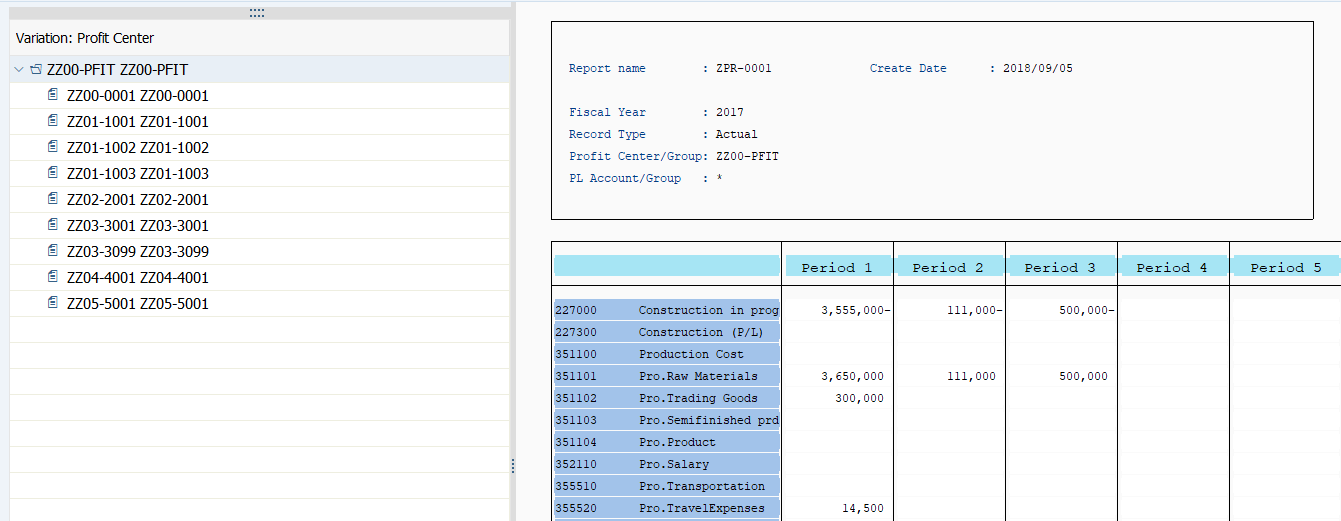
Process Overview: Display Plan /Actual data which is posted to Profit center, by Profit center, Cost elements or period.
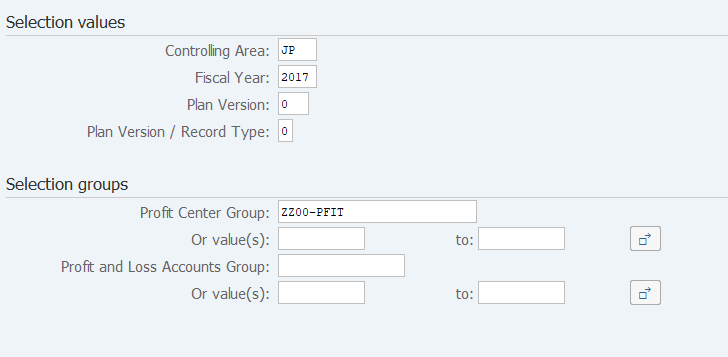
Screen 1:
Operation Process:
| Selection values | |||
| 1. | {{Controlling Area}} | Enter the target Controlling Area. | |
| 2. | {{Fiscal Year}} | Enter the target Fiscal Year. | |
| 3. | {{Plan Version}} | Enter the target Plan Version. | |
| 4. | {{Plan Version / Record Type}} | Enter the target Record Type. (Ex. 0: Actual 1: Plan, etc.) | |
| Selection groups | |||
| 5. | {Profit Center Group} or {Or value(s)} |
Enter the target Profit Center group or Profit Centers. | |
| 6. | {Profit and Loss Accounts Group} or
{Or value(s)} |
Enter the target Profit and Loss Accounts Group or Profit and Loss accounts. | |
| 7. |  |
Click [Execute]. | |
Screen 2:
Operation Process:
| 1. | Setting > Column attributes | Change column width. (After putting a cursor on any column, select the menu pass.) | |
| 2. |  |
Display the other report. ([Call up report]) (After selecting a specifying amount column, click the button.) | |
| 3. |  |
Replace the list by excel sheet, click [Options / Office Integration]. |
Supplement :
| 1. | Enable to drill-down by double-cricking a specifying line. |
Copyright(c) MITSUI KINZOKU YOURSOFT Inc.