Down Payment - Invoice (F-48)
Menu: Accounting > Financial Accounting > Accounts Payable > Document Entry > Down Payment > Down Payment
Process Overview: Post a document for down payment.
Screen 1:
Operation Process:
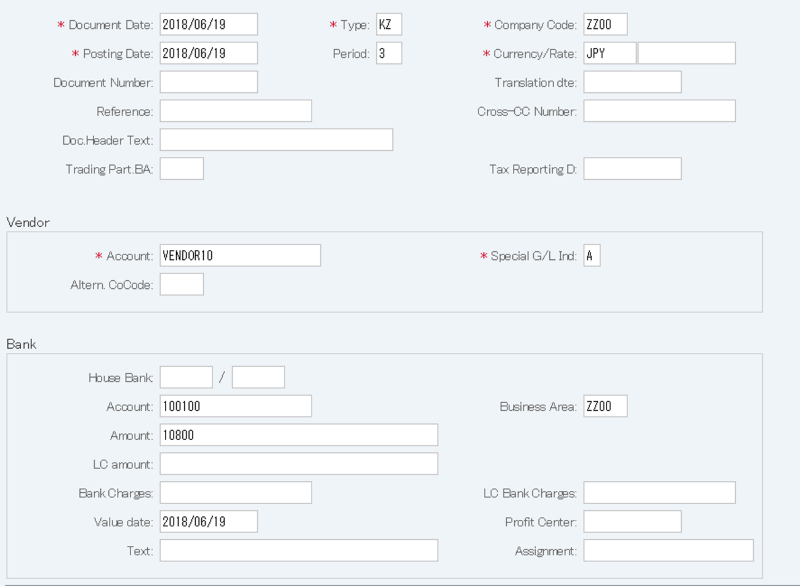
| 1. | {{Document Date}} | Enter any date. (Used as a substitute for a memorandum) | |
| 2. | {{Type}} | Enter the code for classifying the document. (Ex. 'KZ' Vendor payment) | |
| 3. | {{Company Code}} | Enter the Company code for managing the document. (Normally, own company code) | |
| 4. | {{Posting Date}} | Enter the document management date. (Ex. Enter '2016.04.xx' for the document of April 2016.) | |
| 5. | {Period} | Enter an accounting period for managing the document. (Calculated automatically based on the posting date) | |
| 6. | {Currency} | Currency code for managing the item amount. Change if the operation is a foreign currency entry. (Ex. 'JPY' Japanese Yen) | |
| 7. | {Rate} | Enter the Rate when entering a foreign currency. (Not required for the local currency) | |
| 8. | {Doc. Header Text} | Enter the document abstract. | |
| Vendor | |||
| 9. | {{Account}} | Enter the Vendor account. | |
| 10. | {{Special G/L Ind}} | Enter the Special G/L code. (Fixed: 'A' Down payment) | |
| Bank | |||
| 11. | {{Account}} | Enter the Account code of the bank to which down payment was made. | |
| 12. | {{Business Area}} | Enter the Business area of the item. | |
| 13. | {{Amount}} | Enter the item amount. | |
| 14. | {{Value Date}} | Enter the date when payment was made to the bank. | |
| 15. | Press [Enter] key. | ||
Screen 2:
Operation Process:
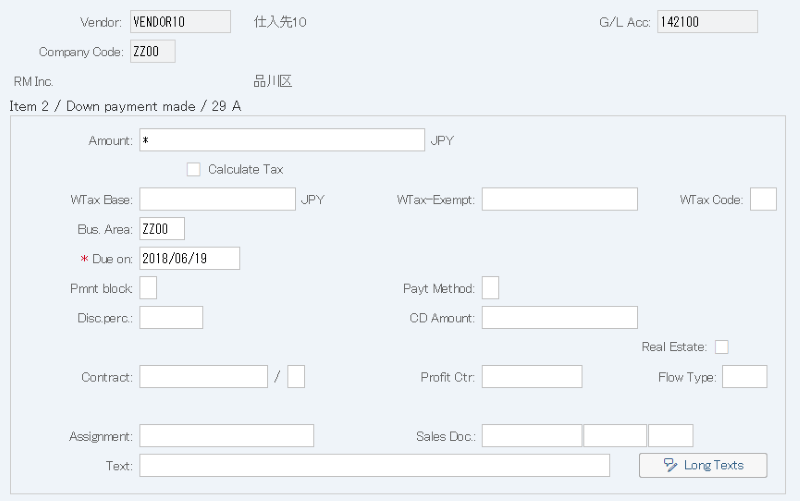
| 1. | {{Amount}} | Enter the payment amount. (Ex. When '*' is entered, the balance amount is calculated automatically.) | |
| 2. | {{Calculate Tax}} | Select when calculating a consumption tax automatically. | |
| 3. | {{Bus. Area}} | Enter the Business area for managing the item. | |
| 4. |  |
Click [Display Document Overview]. |
Screen 3:
Operation Process:
| 1. |  |
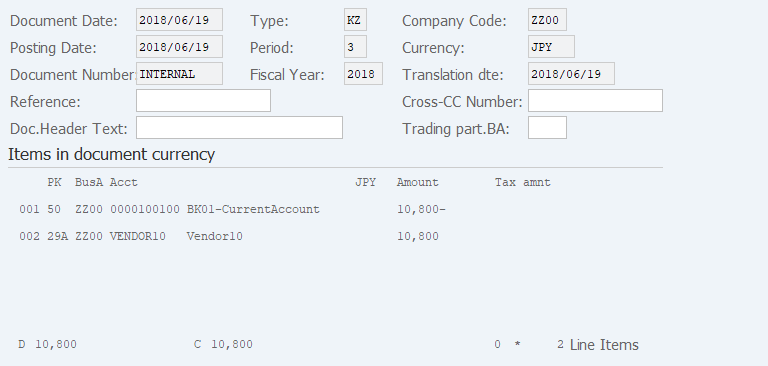
After checking the document, click [Post]. |
Copyright(c) MITSUI KINZOKU YOURSOFT Inc.