Back to Menu No.06-02-04
Balance Carry Forward (Receivable/Payable) (F.07)
| Menu: | Accounting > Financial Accounting > Accounts Receivable > Periodic Processing > Closing > Carry Forward > Balance Carryforward |
| Accounting > Financial Accounting > Accounts Payable > Periodic Processing > Closing > Carry Forward > Balance Carryforward |
Process Overview: Carry forward the Loan/Debt balances.
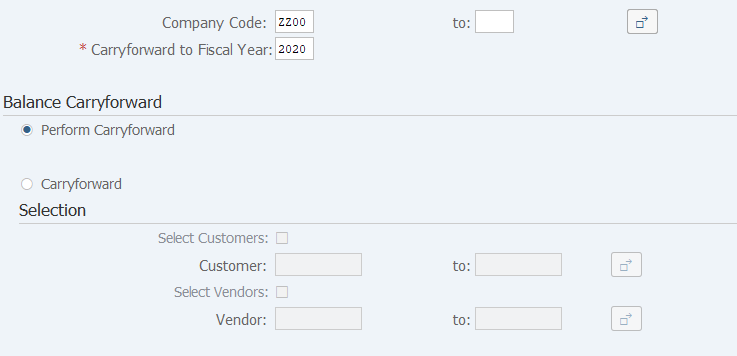
Screen 1:
Operation Process:
| 1. | {{Company code}} | Enter the Company code. | |
| 2. | {{Carryforward to fiscal year}} | Specify the following year. (Ex. 2017 when FS 2016 is ended) | |
| Balance Carry forward | |||
| 3. | {Perform Carryforward} | Select when executing carryforward process. | |
| 4. | {Carryforward} | Select when to confirm carryforward target. | |
| Selection | Option when selecting 'carryforward'. | ||
| 5. | {Select Customers} | Check this option. | |
| 6. | {Customer} | Enter '*' since all the Customers are to be specified. | |
| 7. | {Select Vendors} | Check this option. | |
| 8. | {Vendor} | Enter '*' since all the Vendors are to be specified. | |
| 9. |
 |
Click [Execute]. | |
Remarks:
| 1. | The closing year can be changed even if this processing is executed.The modified amount is reflected to the following year also. |
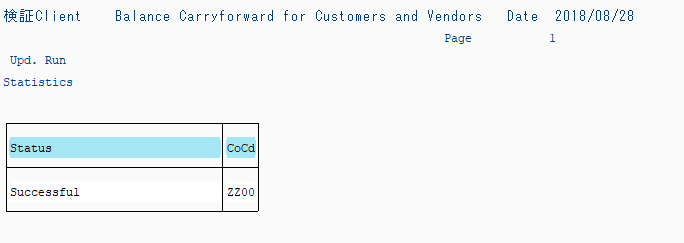
Screen 2:
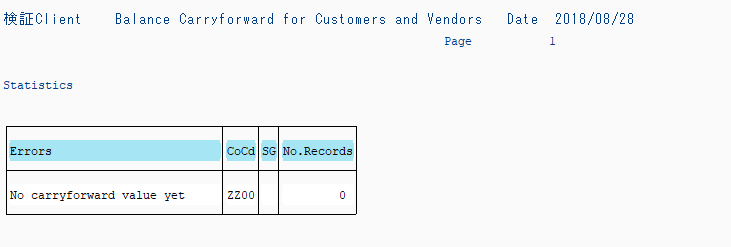
Screen 3:
Copyright(c) MITSUI KINZOKU YOURSOFT Inc.