Back to Menu No.01-01-06
Display Document Changes (FB04)
Menu: Accounting > Financial Accounting > General Ledger > Document > Display Changes
Process Overview: Display details of document changes.
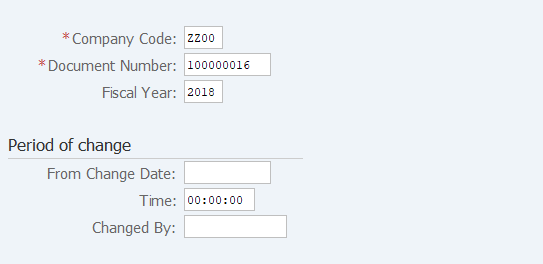
Screen 1:
Operation Process:
| 1. | {{Company Code}} | Enter the Company code of the document to be referenced. (Normally, a company code of own company) | |
| 2. | {{Document Number}} | Enter the Document number to be referenced. | |
| 3. | {{Fiscal Year}} | Enter the Fiscal year of the document to be referenced. | |
| Period of change | |||
| 4. | {From Change Date} | Enter this field when selecting documents based on the change date. | |
| 5. | {Changed By} | Enter this field when selecting documents based on the person who made the change. | |
| 6. |  |
Click [Continue]. | |
Screen 2:
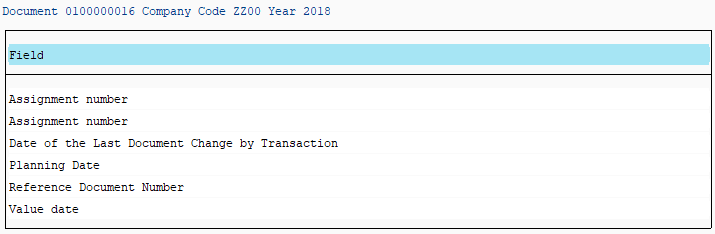
Operation Process:
| 1. |  |
Click [All changes]. |
Screen 3:
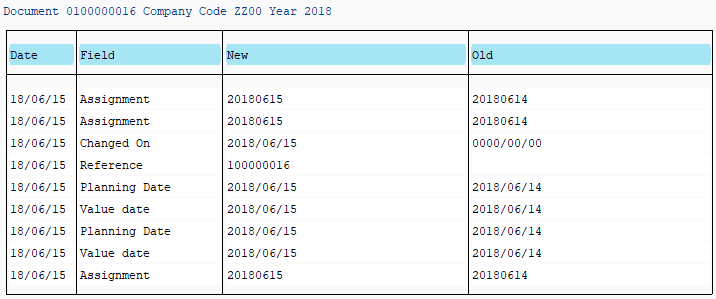
Operation Process:
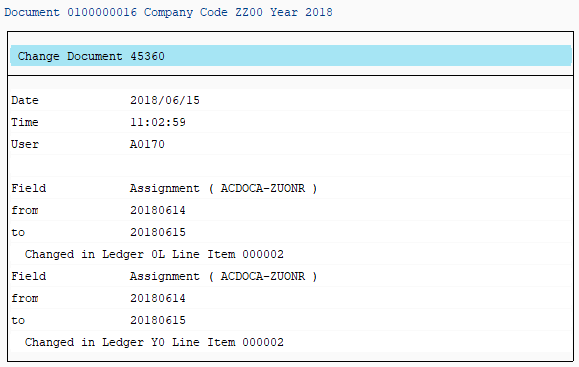
| 1. | Menu: More > Goto > Change document (The user ID of the person who made the change can be checked.) | ||
Supplement:
| 1. | Change date, change field, change contents (before the change (old)) and after the change (new) can be checked. |
Screen 4:
Copyright(c) MITSUI KINZOKU YOURSOFT Inc.