Back to Menu No.01-01-05
Individual Reversal (FB08)
Menu: Accounting > Financial Accounting > General Ledger > Document > Reverse > Individual Reversal
Process Overview: Cancel (reverse) the posted accounting documents.
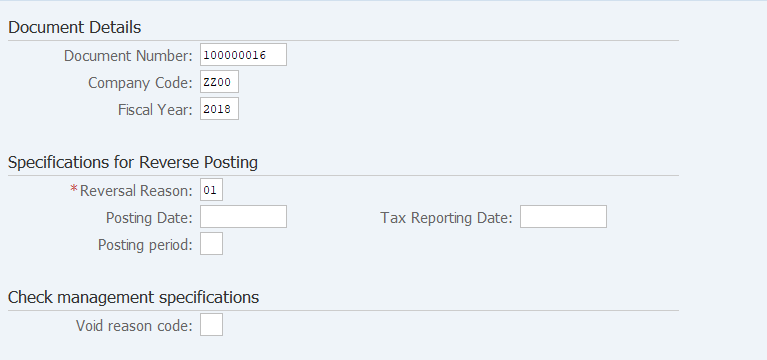
Screen 1:
Operation Process:
| Document Details | |||
| 1. | {{Document Number}} | Enter the Document number to which individual reversal is applied. | |
| 2. | {{Company Code}} | Enter the Company code of the document to which individual reversal is to be applied. (Normally, company code of own company) |
|
| 3. | {{Fiscal Year}} | Enter the Fiscal year of the document to which individual reversal is to be applied. | |
| Specifications for Reverse Posting | |||
| 4. | {{Reversal Reason}} | Enter the Reason for the individual reversal. (Ex. '01' Reversal in current period) | |
| 5. |  |
Click [Display Before Reversal]. | |
Remarks:
| 1. | Note that individual reversal is executed immediately after
 [Post] is clicked. [Post] is clicked.
|
Screen 2:
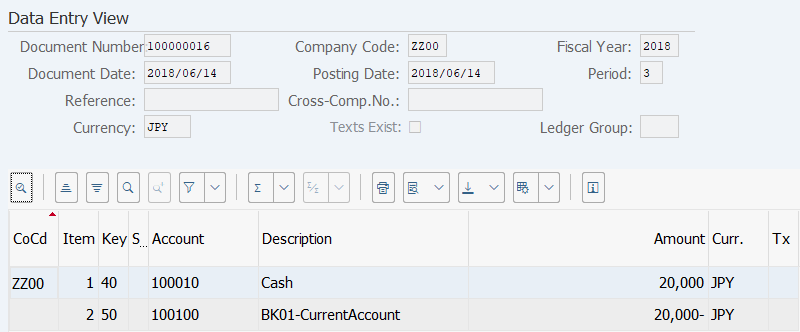
Operation Process:
| 1. | Check the document to which individual reversal is applied. | ||
| 2. |  |
Click [Back]. | |
| 3. | |
Click [Post]. |
Copyright(c) MITSUI KINZOKU YOURSOFT Inc.