General Posting (Enjoy) (FB50)
Menu: Accounting > Financial Accounting > General Ledger > Document Entry > Enter G/L Account Document
Process Overview: Create a general transfer document. The difference from 'F-02' is document entry to both Debit side & Credit side can be done on one single screen.
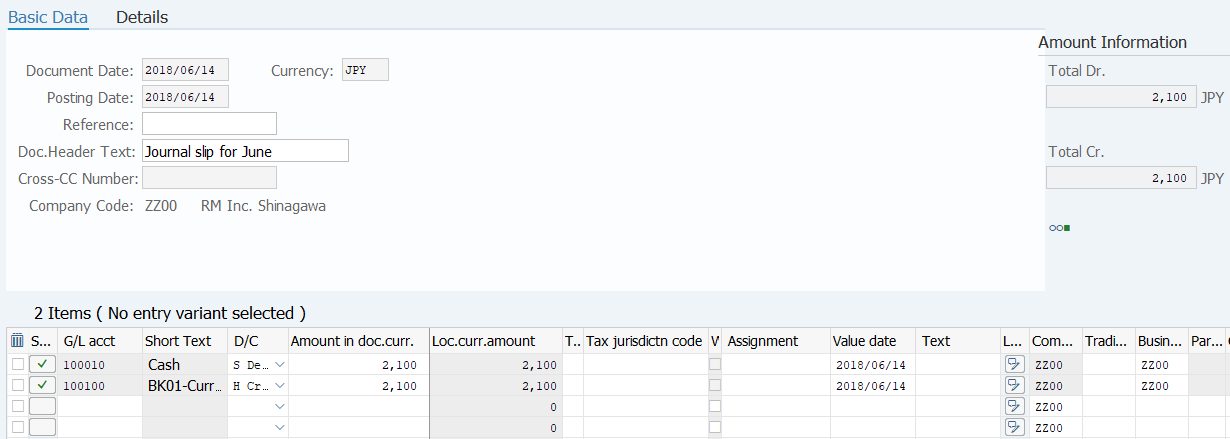
Screen1:
Operation Process:
| Basic Data | |||
| 1. | {{Document Date}} | Enter any date. (Used as a substitute of a memorandum.) | |
| 2. | {{Currency}} | Currency code for managing the item amount. Change if the operation is a foreign Currency entry. (Ex. 'JPY' Japanese Yen) | |
| 3. | {{Posting Date}} | Enter the document management date. (Ex. Enter '2018/06/xx' for the document of June 2018.) | |
| 4. | {Doc.Header Text} | Enter the document abstract. (Ex. 'Account transfer for month XX') | |
| Items | |||
| 5. | {{G/L acct}} | Enter the Account code of the item. | |
| 6. | {{D/C}} | Enter the Debit/Credit of the item. | |
| 7. | {{Amount in doc.curr.}} | Enter the Amount of the item. | |
| 8. | {Assignment} | Enter the Assignment of the report display. | |
| 9. | {Value date} | Enter the baseline date of interest calculation. (Used for cash and bank account code) | |
| 10. | {Text} | Enter the Abstract of the item. (Ex. 'Account transfer for month XX') | |
| 11. | {{Business area}} | Enter the Business area for the item. | |
| 12. | {Trading partner} | For a transaction of a Corporate group company, enter the business partner (Corporate company code) as required. | |
| 13. |  |
Click [Simulate]. | |
Supplement:
| 1. | The account determines whether the input field is mandatory or optional. (The field that is output to the screen varies according to the setting.) | |
| 2. | The document is not complete unless the signal of the amount information column is
 . (This can be checked by pressing [Enter] key.) . (This can be checked by pressing [Enter] key.) Modify or add the necessary field or value. |
Screen 2:
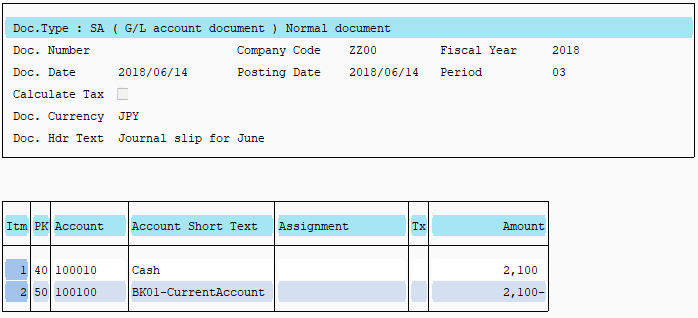
Operation Process:
| 1. |  |
Click [Post]. |
Remarks:
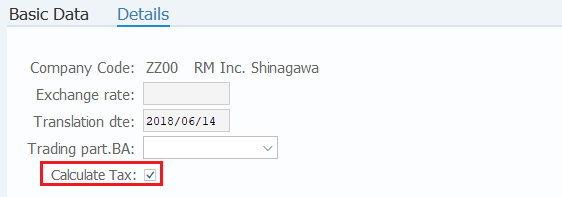
| 1. | When tax calculation is selected (in the detail tab) and a tax code is entered in the taxable account item, a tax account item is added. Check the amount. |
Copyright(c) MITSUI KINZOKU YOURSOFT Inc.