Back to Menu No.02-02-11
Bank Statement Postprocess (FEBA_BANK_STATEMENT)
Menu: Accounting > Financial Accounting > Banks > Incomings > Bank Statement > Postprocess
Process Overview: You change and post item that was not posted automatically when you imported bank statement.
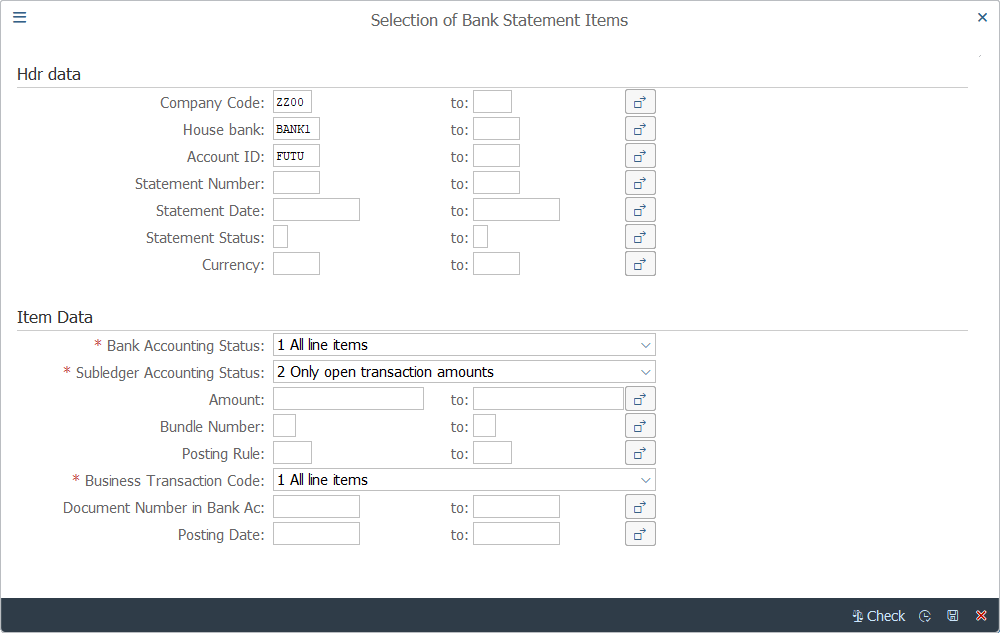
Screen 1:
Operation Process:
| Hdr data | |||
| 1. | {{Company Code}} | Enter Company code. | |
| 2. | {House Bank} | Enter House Bank. | |
| 3. | {Account ID} | Enter Bank Account ID. | |
| 4. | {Statement Date} | Enter Statement Date. | |
| Item Data | |||
| 5. | {Bank Accounting Status} | Select Bank Accounting Status. | |
| 6. | {Subledger Accounting Status} | Select Subledger Accounting Status. | |
| 7. |
 |
Click [Execute]. | |
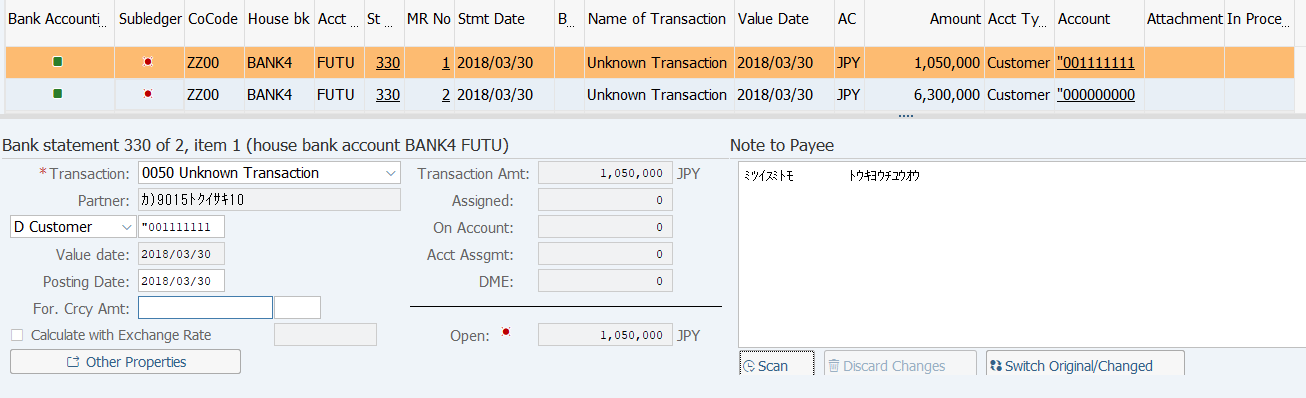
Screen 2:
Operation Process:
| 1. | Select item that you want to change or post. | ||
| 2. |  |
Select [Assignment] tab. |
Screen 3: Clear an open item.

Operation Process:
| 1. | Enter necessary conditions. | ||
| 2. |  |
Click [Start Search]. |
Supplement:
| 1. | If the Item Details are not displayed, click  [Read More Items] to display.
 |
|
| 2. | It is possible to add search condition up to 5. |
Screen 4:

Operation Process:
| 1. | Select an item by double-clicking on 'Assigned' of the document. | ||
| 2. |  |
Select [On Account] tab. |
Screen 5: Enter customer or vendor items without reference invoice.

Operation Process:
| 1. | {{Acct type}} | Enter the Account type of the item. | |
| 2. | {{Account}} | Enter the Customer/Vendor code of the item. | |
| 3. | {{D/C}} | Enter the Debit/Credit of the item. | |
| 4. | {{Amount}} | Enter the Amount of the item. | |
| 5. | {Text} | Enter the item abstract. | |
| 6. |  |
Select [Account Assignment] tab. |
Screen 6: Enter the G/L account item for charges, interest payments, or currency differences.

Operation Process:
| 1. | {{G/L Account}} | Enter the Account code of the item. | |
| 2. | {{D/C}} | Enter the Debit/Credit of the item. | |
| 3. | {{Amount}} | Enter the Amount of the item. | |
| 4. | {Text} | Enter the item abstract. | |
| 5. |  |
Click [Post]. |
Supplement:
| 1. | The account determines whether the input field is mandatory or optional. | |
| 2. | The document is not complete unless the signal of the Open is
 . Modify or add the necessary field or value. . Modify or add the necessary field or value. |
Copyright(c) MITSUI KINZOKU YOURSOFT Inc.