Create Memo Record (FF63)
Menu: Accounting > Financial Supply Chain Management > Cash and Liquidity Management > Memo Record > Create Memo Record
Process Overview: Create a memo record of a bank account.
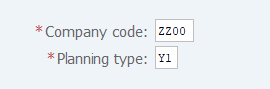
Screen 1:
Operation Process:
| 1. | {{Company code}} | Enter the Company code for the memo record. | |
| 2. | {{Planning type}} | Enter the memo record type. (Ex. 'Y1' Pln deposit / 'Y2' Pln disbursement) | |
| 3. |  |
Click [Single Entry]. |
Screen 2:
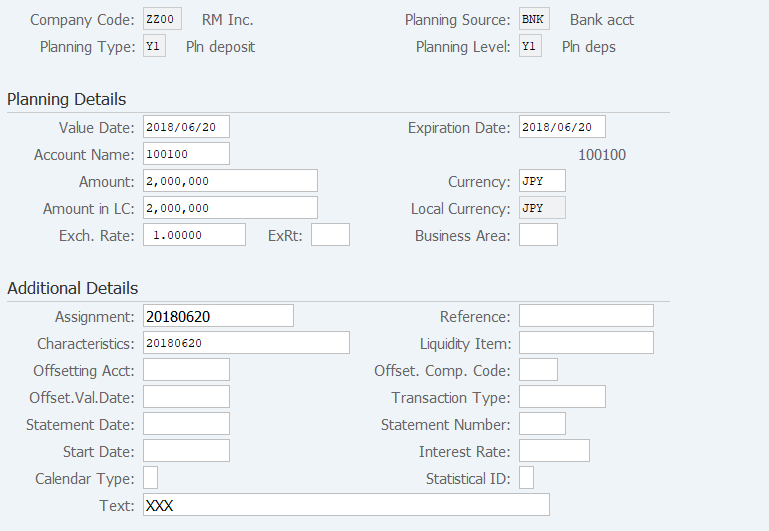
Operation Process:
| Planning Details | |||
| 1. | {{Value Date}} | Enter the cash moving schedule. | |
| 2. | {Expiration Date} | Enter the display expiration date to a cash position report. (If the date is not entered, the starting date is copied.) | |
| 3. | {{Account Name}} | Enter the bank account of the cash moving target. | |
| 4. | {{Amount}} | Enter the moving schedule amount. (For a disbursement schedule, add '-'.) | |
| 5. | {{Currency}} | (Plan type 'Y1' Pln deposit) Enter the transaction schedule currency code. | |
| 6. | {Amount in LC} | (Plan type 'Y1' Pln deposit) Automatically calculated from the amount and rate. | |
| 7. | {Exch. Rate} | (Plan type 'Y1' Pln deposit) Automatically acquired from the table. When a rate is entered, the amount in local currency is calculated from the input value. |
|
| 8. | {Business Area} | Enter the Business area to which the cash is moved. | |
| Additional Details | |||
| 9. | {Assignment} | Enter the Memo. | |
| 10. | {Characteristics} | Enter the Memo. | |
| 11. | {Text} | Enter the Memo. | |
| 12. |  |
Click [Save]. | |
Supplement:
| 1. | Check that the memo record is reflected in 05-01-03.Liquidity Forecast List (FF7BN). |
Copyright(c) MITSUI KINZOKU YOURSOFT Inc.