
Back to Menu No.02-04-04
Display Electronic Bank Statement (FF_6)
Menu: Accounting > Financial Accounting > Banks > Input > Bank Statement > Display
Process Overview: Display Electronic Bank Statement.
Screen 1:
Operation Process:
| 1. | {{Program}} | Double-click the row in [RFEBKAJ0]. |
Screen 2:
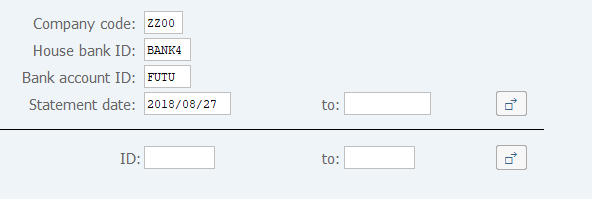
Operation Process:
| 1. | {{Company code}} | Enter the Company code. | |
| 2. | {{House bank ID}} | Enter the House bank ID. | |
| 3. | {{Bank account ID}} | Enter the Bank account ID. | |
| 4. | {Statement date} | Enter the Statement date. | |
| 5. | {ID} | Enter the Statement ID. | |
| 6. |
 |
Click [Execute]. |
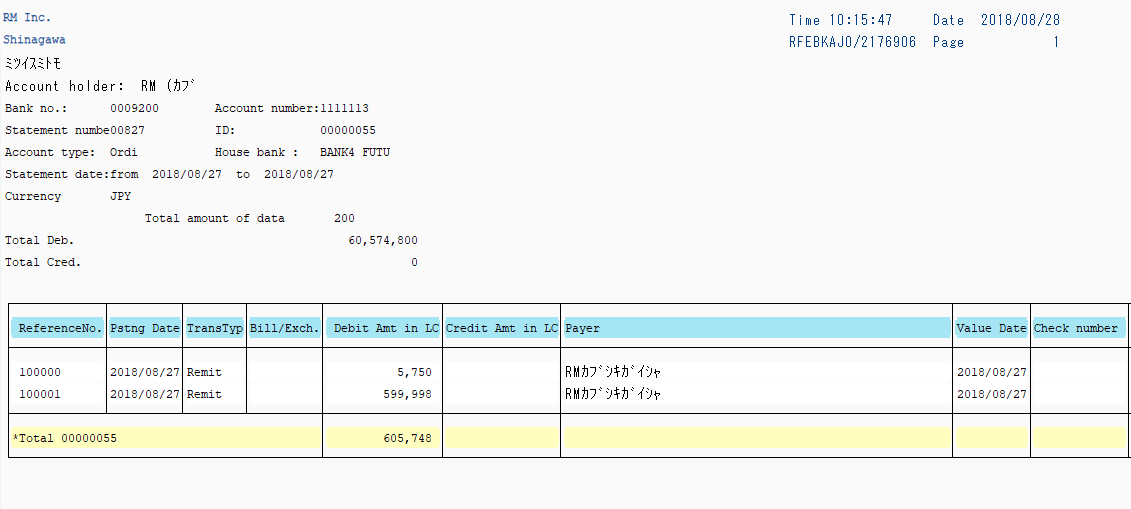
Screen 3:
Copyright(c) MITSUI KINZOKU YOURSOFT Inc.