Back to Menu No.01-04-09
G/L Line Items / List for Printing (S_ALR_87012282)
Menu: Accounting > Financial Accounting > General Ledger > Information System > General Ledger Reports > Line Item > G/L Line Items, List for Printing
Process Overview: Display the list of open items by specifying Base line date, account item.
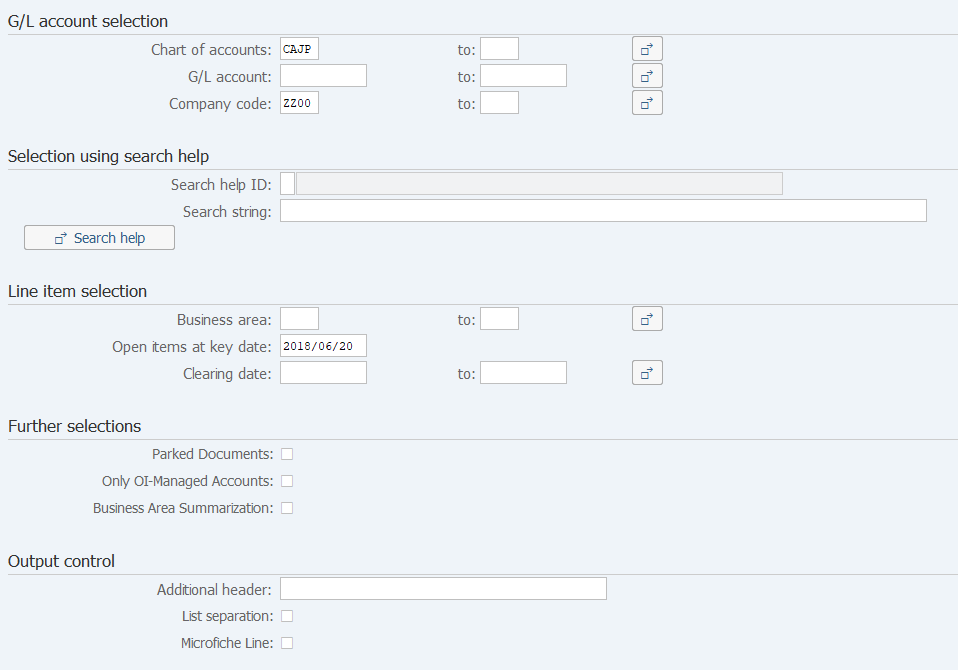
Screen 1:
Operation Process:
| G/L account selection | |||
| 1. | {Chart of accounts} | Select the Chart of accounts. (Ex. 'CAJP': Chart of accounts Japan) | |
| 2. | {G/L accounts} | Select the Account code. | |
| 3. | {Company code} | Select the Company code. | |
| Line item selection | |||
| 4. | {Business area} | Select the Business area. | |
| 5. | {{Open items at key date}} | Items are posted on or before the specified baseline date and all the open items during the period are selected. | |
| Further selections | |||
| 6. | {Only OI-Managed Accounts} | When this option is checked, only the accounts that are managed for open items are output. | |
| 7. |  |
Click [Execute]. | |
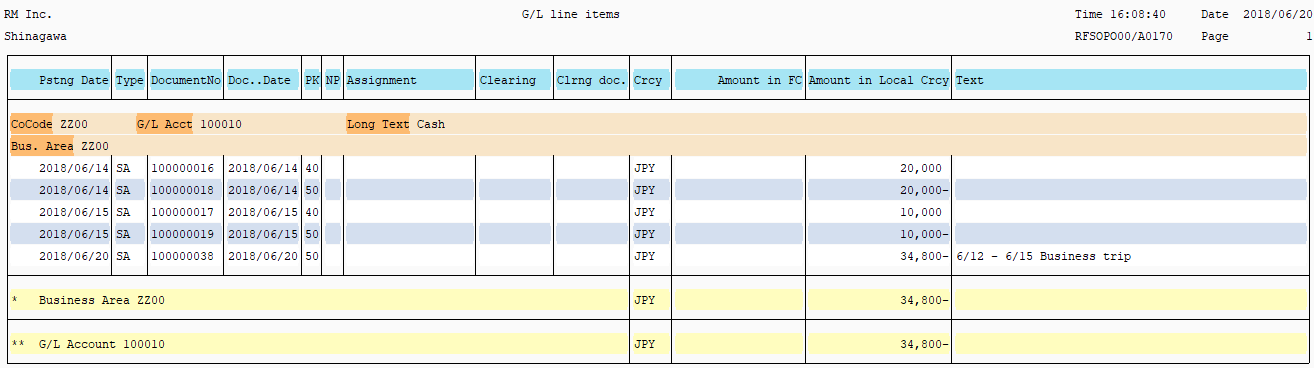
Screen 2:
Copyright(c) MITSUI KINZOKU YOURSOFT Inc.