Back to Menu No.03-02-05
Change Baseline Date (YRFI0009)
Menu: Accounting > Financial Accounting > Add: Function > Add: Accounts Payable > Change Baseline Date
Process Overview: Change Baseline dates of payment documents collectively.
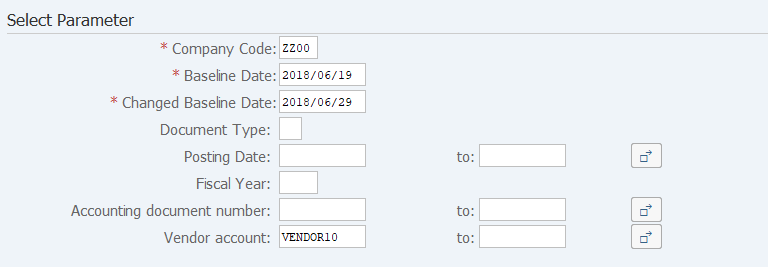
Screen 1:
Operation Process:
| Select Parameter | |||
| 1. | {{Company Code}} | Enter the Company code. | |
| 2. | {{Baseline Date}} | Enter the ore-change baseline date. | |
| 3. | {{Changed Baseline Date}} | Enter the Changed baseline date. | |
| 4. | {Document Type} | Enter the Document type. | |
| 5. | {Posting Date} | Enter the Posting date. | |
| 6. | {Fiscal Year} | Enter the Fiscal year. | |
| 7. | {Accounting document number} | Enter the Accounting document number. | |
| 8. | {Vendor account} | Enter the Vendor account. | |
| 9. |  |
Click [Execute]. | |
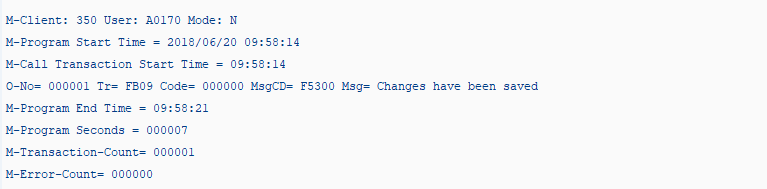
Screen 2:
Operation Process:
| 1. | Check that there is no error. |
Remarks:
| 1. | The changed document number is not displayed. Check the target document number in advance. |
Copyright(c) MITSUI KINZOKU YOURSOFT Inc.