Back to Menu No.01-05-01
Open Item List (YRFI0016)
Menu: Accounting > Financial Accounting > Add: Download > Add: General Ledger > Open Item List
Process Overview: Display Open item list by Account. Open items at the time of specified Posting date can be checked, tracing back to the previous records.
Screen 1:
Operation Process:
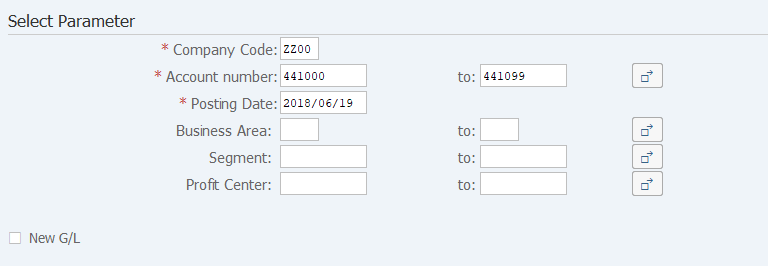
| Select Parameter | |||
| 1. | {{Company Code}} | Enter the Company code for creating a list. | |
| 2. | {{Account number}} | Enter the Account code for creating a list. | |
| 3. | {{Posting Date}} | Enter the Posting date for creating a list. (Open items at the posting date are selected.) | |
| 4. | {Business Area} | Enter the Business area for creating a list. | |
| 5. | {Segment} | Enter the Segment for creating a list. (Entry is allowed when 'New G/L' is selected.) | |
| 6. | {Profit Center} | Enter the Profit center for creating a list. (Entry is allowed when 'New G/L' is selected.) | |
| 7. | {New G/L} | Select this option for selecting new G/L data. | |
| 8. |  |
Click [Execute]. | |
Remarks:
| 1. | When 'New G/L' is selected, specify one of the Business area, Segment, or Profit center. |
Screen 2:
Operation Process:
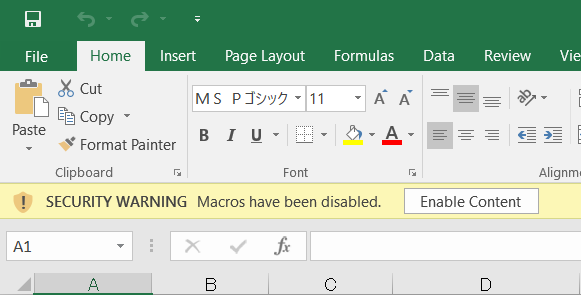
| 1. |  |
Click [Enable Content]. |
Screen 3:

Copyright(c) MITSUI KINZOKU YOURSOFT Inc.