Back to Menu No.01-05-08
Consumption tax item list 2 (YRFI0028)
Menu: Accounting > Financial Accounting > Add: Download > Add: General Ledger > Consumption Tax Item List 2
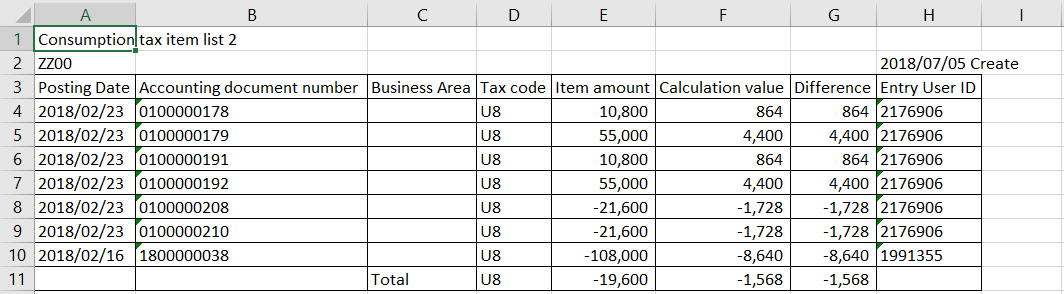
Process Overview: Download the confirming list of document item which does not include consumption tax account though it should be taxable for consumption tax.
Screen 1:
Operation Process:
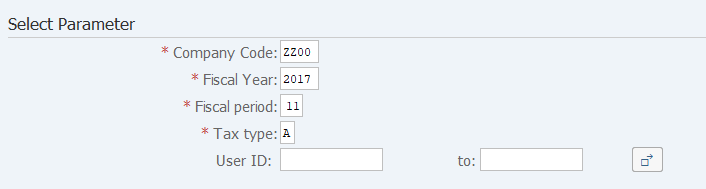
| Select Parameter | |||
| 1. | {{Company Code}} | Enter the Company code. | |
| 2. | {{Fiscal Year}} | Enter the Fiscal Year for extraction. | |
| 3. | {{Fiscal period}} | Enter the Fiscal period for extraction. | |
| 4. | {{Tax type}} | Enter the Tax type for confirmation (Ex. "V" Input tax, "A" Output tax). | |
| 5. | {User ID} | Enter the User ID. | |
| 6. |  |
Click [Execute]. | |
Screen 2:
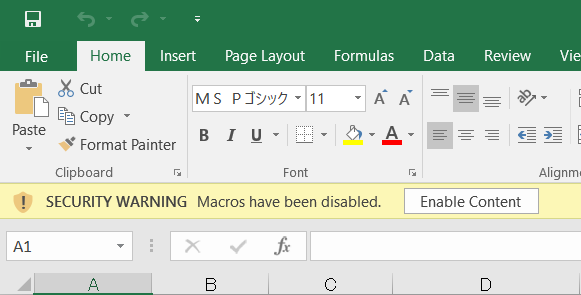
Operation Process:
| 1. |  |
Click [Enable Content]. |
Screen 3:
Supplement:
| 1. | 'Item amount' : Taxation amount. | |
| 2. | 'Calculation value', 'Difference' : Consumption tax amount of calculated taxation amount with rate of tax code. |
Copyright(c) MITSUI KINZOKU YOURSOFT Inc.