Back to Menu No.08-01-01
Sales Summary List (YRFI0036)
Menu: Accounting > Financial Accounting > Add: Download > Add: Accounts Receivable > Sales Summary List
Process Overview: Create the list of sales value for the customer which has 'Our account number at customer' pre-set in customer master.
Screen 1:
Operation Process:
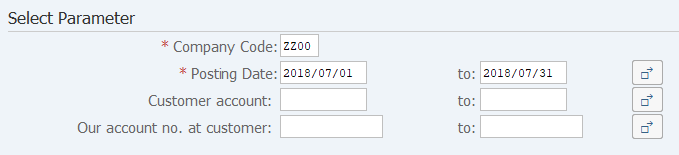
| Select Parameter | |||
| 1. | {{Company Code}} | Enter the Company code. | |
| 2. | {{Posting Date}} | Enter the Posting dates. | |
| 3. | {Customer account} | Enter the Customer account. | |
| 4. | {Our account no. at customer} | Enter the Our account number at customer. | |
| 5. |  |
Click [Execute]. | |
Screen 2:
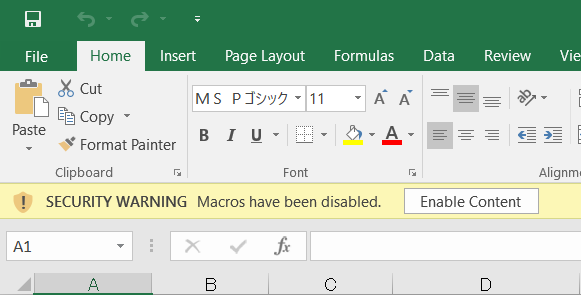
Operation Process:
| 1. |
 |
Click [Enable Content]. |
Screen 3:

Copyright(c) MITSUI KINZOKU YOURSOFT Inc.