Back to Menu No.01-02-05
Create Sample Document with Reference (YRFI0038)
Menu: Accounting > Financial Accounting > Add: Function > Add: General Ledger > Create Sample Doc with Reference
Process Overview: Create Sample documents by batch input, referring to another Sample document or Posted document.
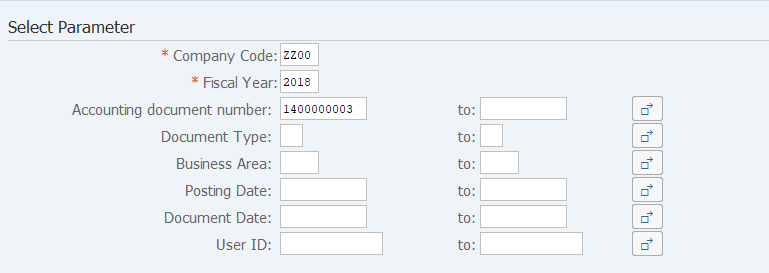
Screen 1:
Operation Process:
| Select Parameter | |||
| 1. | {{Company Code}} | Enter a target Company code of referred document. | |
| 2. | {{Fiscal Year}} | Enter a target Fiscal year of referred document. | |
| 3. | {Account document number} | Enter target Account document numbers of referred documents. | |
| 4. | {Document Type} | Enter target Document types of referred documents. | |
| 5. | {Business Area} | Enter target Business areas of referred documents. | |
| 6. | {Posting Date} | Enter target Posting dates of referred documents. | |
| 7. | {Document Date} | Enter target Document dates of referred documents. | |
| 8. | {User ID} | Enter target User IDs of referred documents. | |
| 9. |  |
Click [Execute]. | |
Remarks:
| 1. | The Account document posted specifying the ledger is off the subject. |
Screen 2:
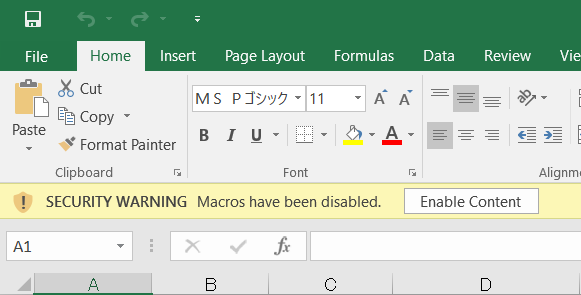
Operation Process:
| 1. |  |
Click [Enable Content]. |
Screen 3:

Operation Process:
| 1. | {{Accounting document number}} | Input the Account document number to be created. | |
| 2. | Overwrite some fields as necessary, for example Currency, Amount, Tax code. | ||
| 3. |  |
Click [Macro Run]. |
Screen 4:
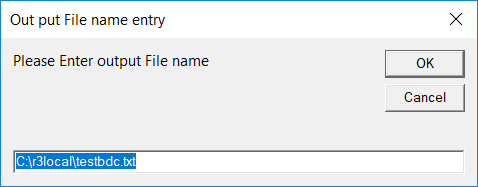
Operation Process:
| 1. |  |
Click [OK]. |
Screen 5:
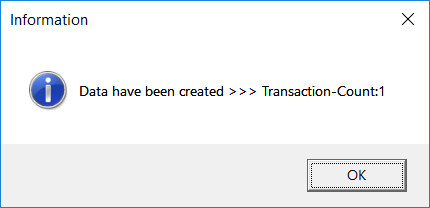
Operation Process:
| 1. | |
Click [OK]. | |
| 2. | Execute 'General Batch Input' (T-cd:YR990001). |
Remarks:
| 1. | The Document number has to be unique among the same company code and the same fiscal year. It is necessary to delete the original Sample document by T-cd:YRFI0053 before creating the Same document number. |
Copyright(c) MITSUI KINZOKU YOURSOFT Inc.