Back to Menu No.07-02-02
List of Account Master (YRFI0046)
Menu: Accounting > Financial Accounting > Add: Download > Add: General Ledger > List of Account Master
Process Overview: Outputs the data of Account master.
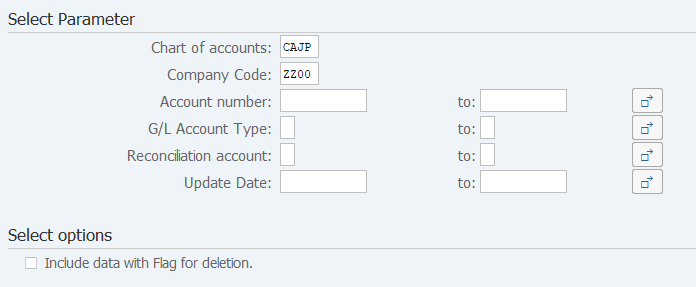
Screen 1:
Operation Process:
| Select Parameter | |||
| 1. | {Chart of accounts} | Enter the target Chart of accounts. | |
| 2. | {Company Code} | Enter the target Company Code. | |
| 3. | {Account number} | Enter the target Account number. | |
| 4. | {Reconciliation account} | Enter the target Reconciliation account. | |
| 5. | {Update Date} | Enter the target Update Date. | |
| Select options | |||
| 6. | {Include data with Flag for deletion} | Select this option when a master with deletion flag set is also output. | |
Operation Process:
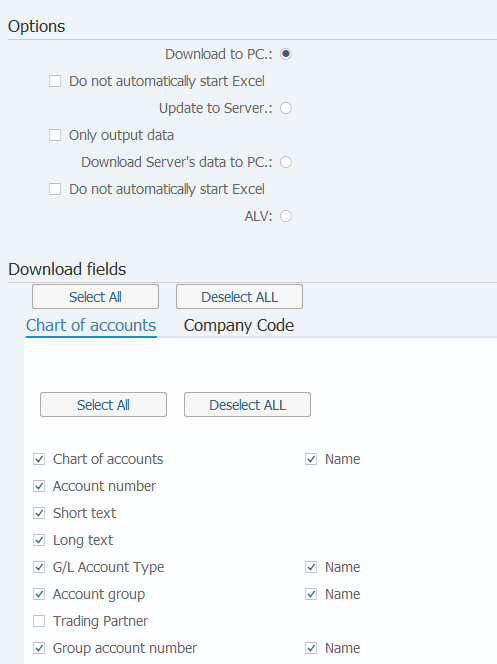
| Options | |||
| 7. | {Download to PC.} | Select this option to download and display the extracted data in Excel. To Screen 2 | |
| 8. | {Do not automatically start Excel} | Select this option when not starting Excel automatically concurrently with program execution. | |
| 9. | {Update to Server.} | Select this option when download the data to SAP ERP server. To Screen 4 | |
| 10. | {Only output data} | Select this option if field name line doesn't need to be downloaded. | |
| 11. | {Download Server's data to PC.} | Select this option when download the data that had downloaded to SAP ERP server to local PC. To Screen 2 | |
| 12. | {Do not automatically start Excel} | Select this option when not starting Excel automatically concurrently with program execution. | |
| 13. | {ALV} | Select this option to display the extracted data on screen. To Screen 5 | |
| Download fields | |||
|
14. |
Select the necessary fields. | ||
| 15. |  |
Click [Execute]. | |
Supplement:
| 1. | The option 'Update to server' can be executed in background. | |
| 2. | If execute this program with selecting the option 'Update to sever', the downloaded data will overwrite the old that downloaded by same User ID at server. | |
| 3. | When you download data that had downloaded to server by option 'Only output data', please check the box of 'Do not automatically start Excel'. |
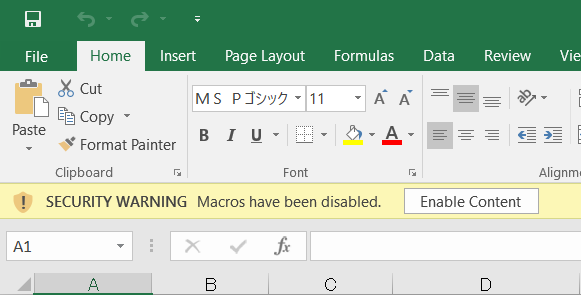
Operation process:
| 1. |
 |
Click [Enable Content]. |
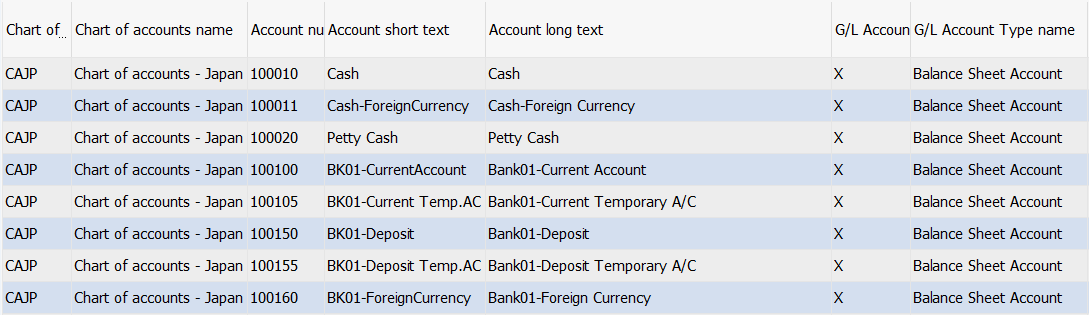
Screen 3:


Copyright(c) MITSUI KINZOKU YOURSOFT Inc.