Back to Menu No.01-01-09
Cancellation of Clearing Document (YRFI0056)
Menu: Accounting > Financial Accounting > Add: Function > Add: General Ledger > Cancellation of Clearing Document
Process Overview: Cancel clearing process and post the reverse document against the clearing document.
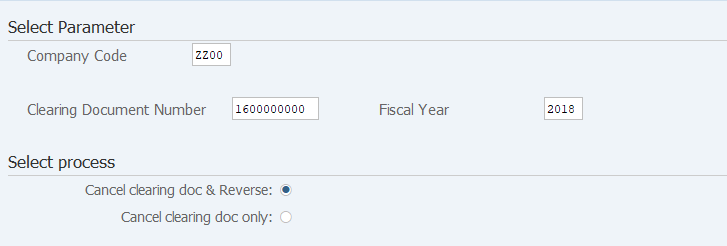
Screen 1:
Operation Process:
| Select Parameter | |||
| 1. | {{Company Code}} | Enter the Company code of the document to be cancelled. | |
| 2. | {{Clearing Document Number}} | Enter the Clearing document number to be cancelled. | |
| 3. | {{Fiscal Year}} | Enter the Fiscal year of the document to be cancelled. | |
| Select Process | |||
| 4. | {Cancel clearing doc & Reverse} | Select this option when performing cancellation and reversal. (Ex. Select this option when canceling the document for clearing and posting) |
|
| 5. | {Cancel clearing doc only} | Select this option when cancellation of clearing only. (Ex. Select this option when performing account clearing or customer/vendor clearing.) |
|
| 6. |  |
Click [Execute]. | |
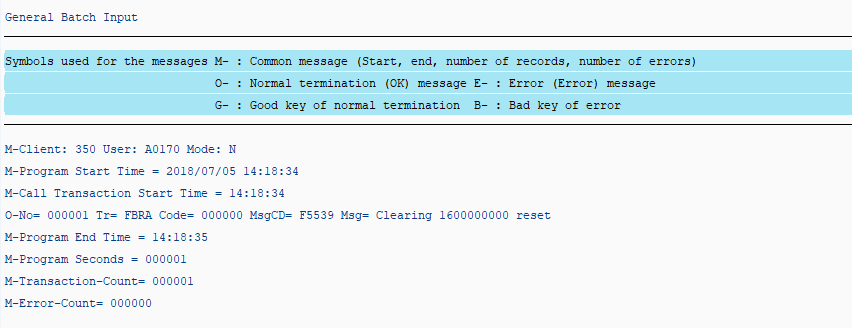
Screen 2:
Operation Process:
| 1. | Cancellation of clearing terminated normally. | ||
| 2. |  |
Click [Back]. |
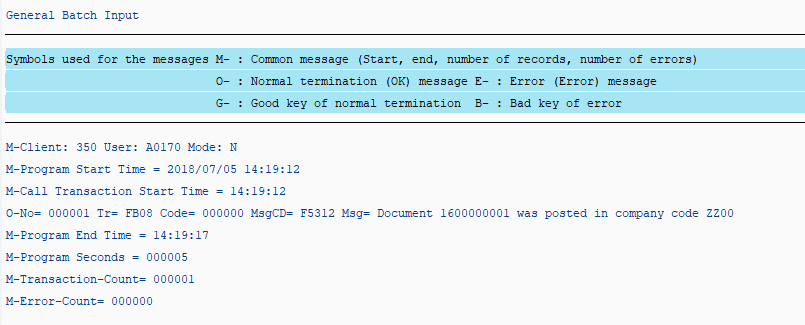
Screen 3:
Operation Process:
| 1. | Reversal processing is completed. |
Remarks:
| 1. | This screen is not displayed for clearing cancellation only. (Terminates at Screen 2.) |
Copyright(c) MITSUI KINZOKU YOURSOFT Inc.